

Technologist Mag
  • Home
  • Tech News
  • AI
  • Apps
  • Gadgets
  • Gaming
  • Guides
  • Laptops
  • Mobiles
  • Wearables
  • More
    • Web Stories
    • Trending
    • Press Release

Subscribe to Updates

Get the latest tech news and updates directly to your inbox.

What's On
Amazon Can Use Your Twitch Content to Train Its AI—Unless You Opt Out

Amazon Can Use Your Twitch Content to Train Its AI—Unless You Opt Out

15 August 2026
You don’t need a document scanning app. Your iPhone has you covered

You don’t need a document scanning app. Your iPhone has you covered

15 August 2026
Puerto Rico Is Rationing Water. It Could’ve Avoided It by Harvesting Rainwater

Puerto Rico Is Rationing Water. It Could’ve Avoided It by Harvesting Rainwater

15 August 2026
I switched from Windows to Mac after 25 years, and it’s the trackpad that converted me.

I switched from Windows to Mac after 25 years, and it’s the trackpad that converted me.

15 August 2026
Zyzz Was the Original Looksmaxxer. His Rise and Untimely Death Feel More Relevant Than Ever

Zyzz Was the Original Looksmaxxer. His Rise and Untimely Death Feel More Relevant Than Ever

15 August 2026
Facebook X (Twitter) Instagram
Technologist Mag
SUBSCRIBE
  • Home
  • Tech News
  • AI
  • Apps
  • Gadgets
  • Gaming
  • Guides
  • Laptops
  • Mobiles
  • Wearables
  • More
    • Web Stories
    • Trending
    • Press Release
Technologist Mag
Home » You don’t need a document scanning app. Your iPhone has you covered
Tech News

You don’t need a document scanning app. Your iPhone has you covered

By technologistmag.com15 August 20263 Mins Read
You don’t need a document scanning app. Your iPhone has you covered
Share
Facebook Twitter Reddit Telegram Pinterest Email

Whether you are trying to keep your invoices organized for tax season or just want a digital backup of important papers, scanning documents on your iPhone is one of those small habits that pays off later. 

That’s why document scanning apps have become so popular on the App Store. But what most people don’t realize is that you do not need to download a single third-party scanner app. Your iPhone already has several built-in tools that do the job well, and today I will show you how to use them.

Scan documents using the Notes app

If Apple Notes is your main repository of notes and documents, you will be happy to know that you can scan your invoices directly inside the Apple Notes app. It gives you two ways to scan a document, and honestly, either one works great depending on what you are trying to do. 

If you just want to scan something without worrying about which note it lands in, long-press the Notes app icon on your Home Screen and tap Scan Document. This launches the built-in scanner right away. From here, you can either let the app automatically detect your document’s edges and scan it, or tap the shutter button to capture it manually.

If you aren’t happy with how it turned out, you can use the Retake button to try again. Once the scan looks good, you can fine-tune the boundary by dragging the corner handles. If you have multiple pages to scan, repeat this same process for each one. 
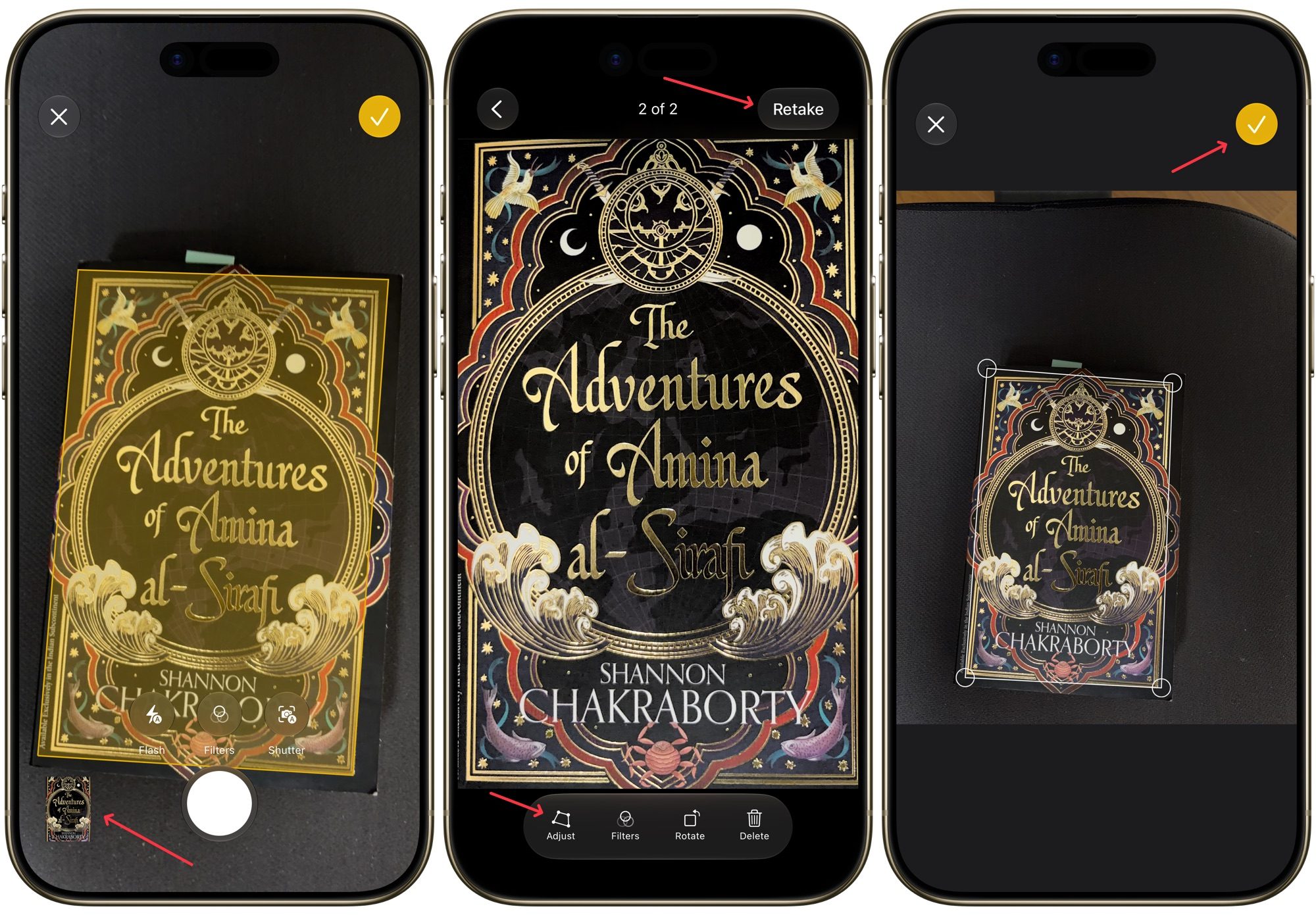
adjusting-scan-on-iphone

When you are all done, tap the yellow checkmark button, and the app will bundle the pages into a single PDF and drop it into a new note. If you would rather have separate files instead of a combined PDF, tap the button after each individual scan instead of waiting until the end. 

If you want to save a document inside a specific note, you can do that too. Just open the note where you want to save the scanned document and tap the paperclip attachment icon in the keyboard toolbar. Now, tap the Scan Documents button and follow the steps to scan your documents. 
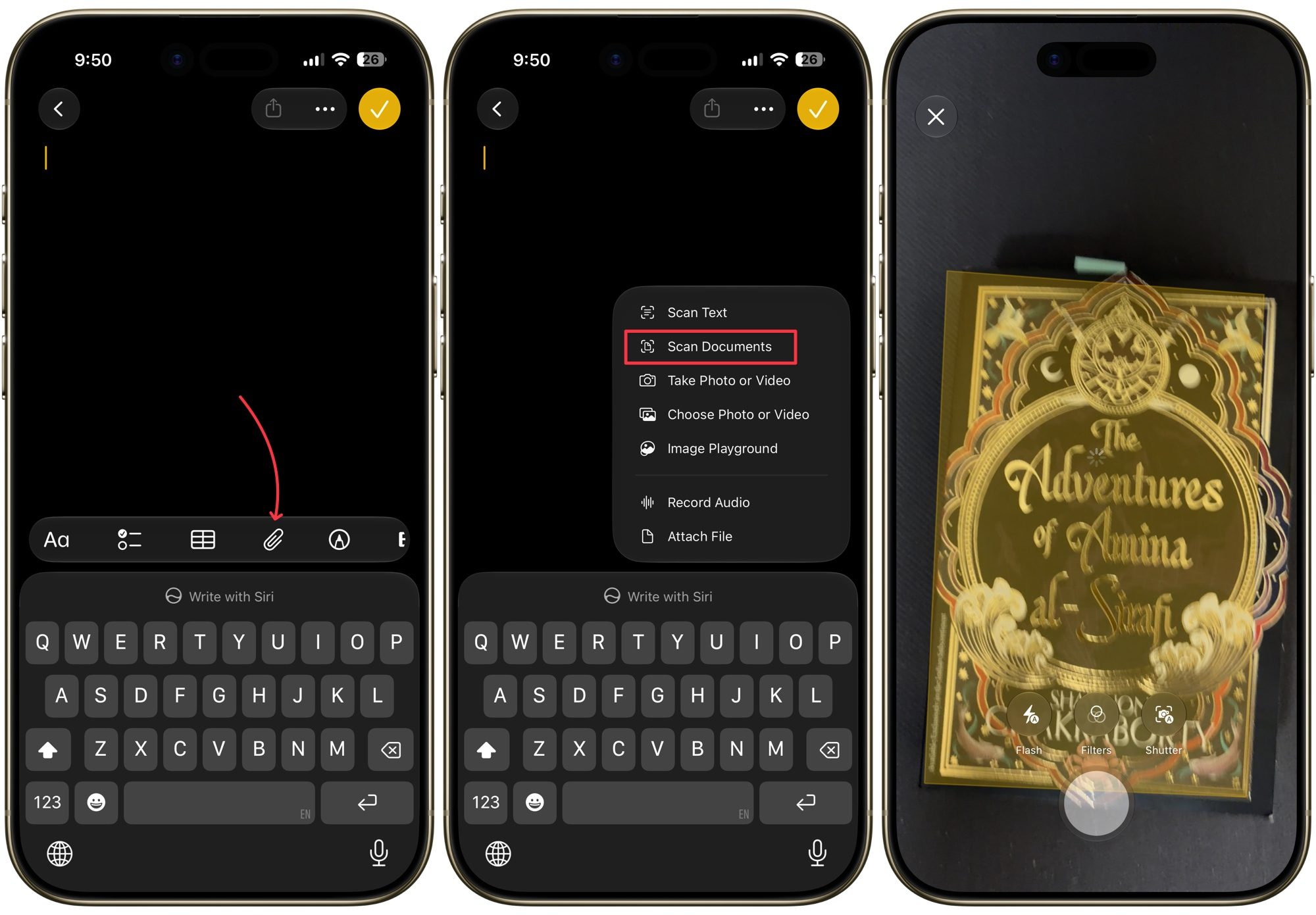
scanning-documents-inside-a-note

Scan documents using the Files app

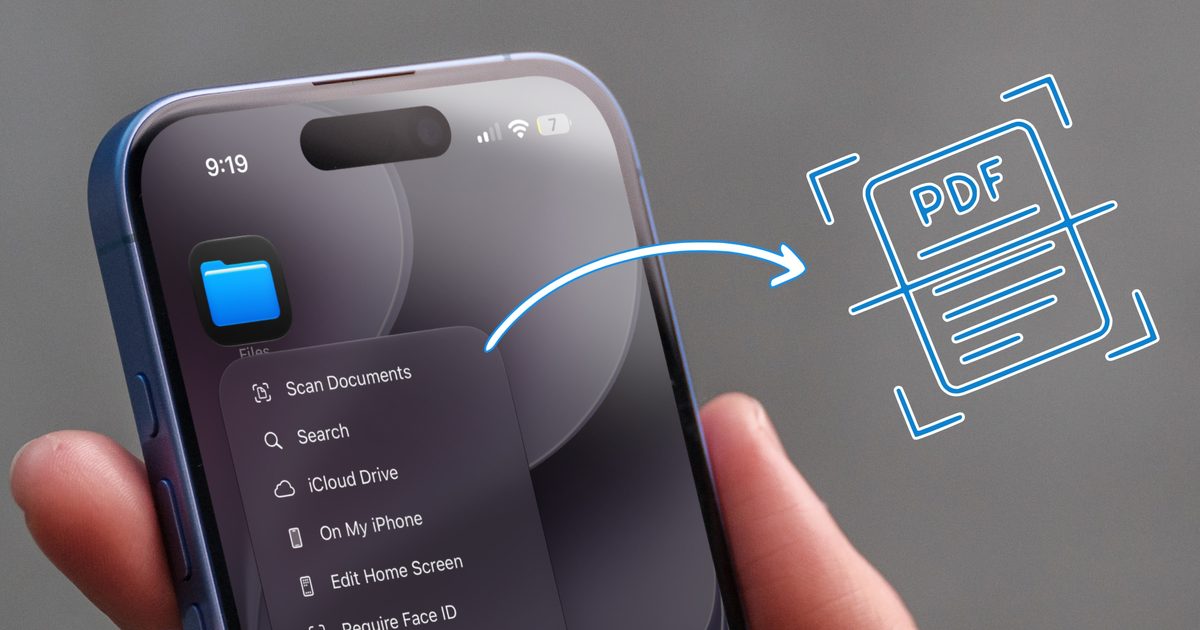
The Files app follows a very similar routine, and honestly, it might be the better home for your scans if you are trying to keep things organized by folder. Long-press the Files app icon on your Home Screen and choose Scan Documents to jump straight into the scanner. 
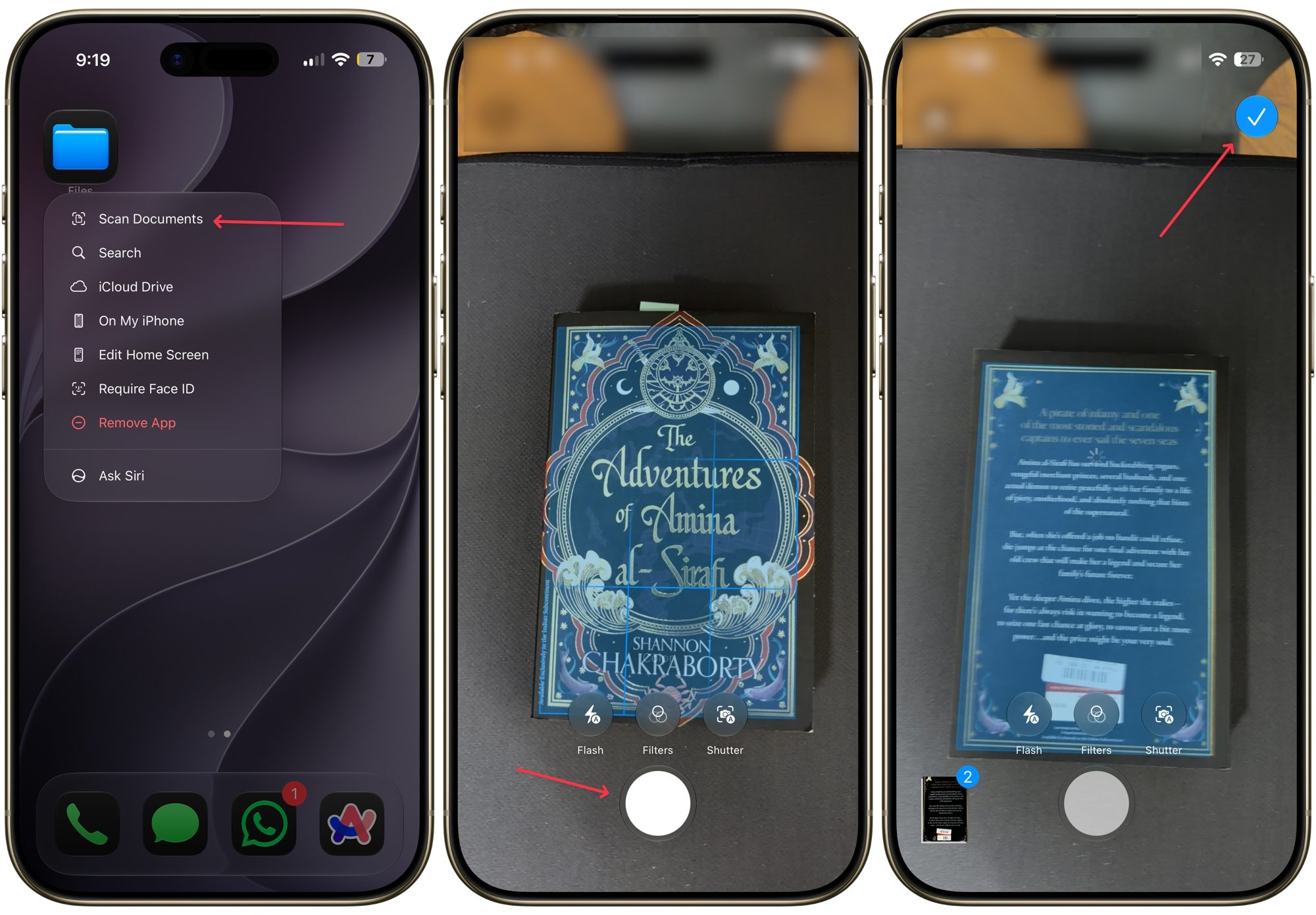
scanning documents via files app

From here, everything works the same way as it did in Notes. You capture the page, adjust the corners if needed, and repeat for as many pages as you need. The only extra step here is that once you tap Save, you will need to pick exactly which folder you want the file saved to before confirming in the top-right corner.

If you already know exactly where you want the scan to live, there is an even faster route. Open that specific folder inside the Files app, tap the three-dot menu in the top right corner, and select Scan Documents. Your file will save directly into that folder without any extra navigating.
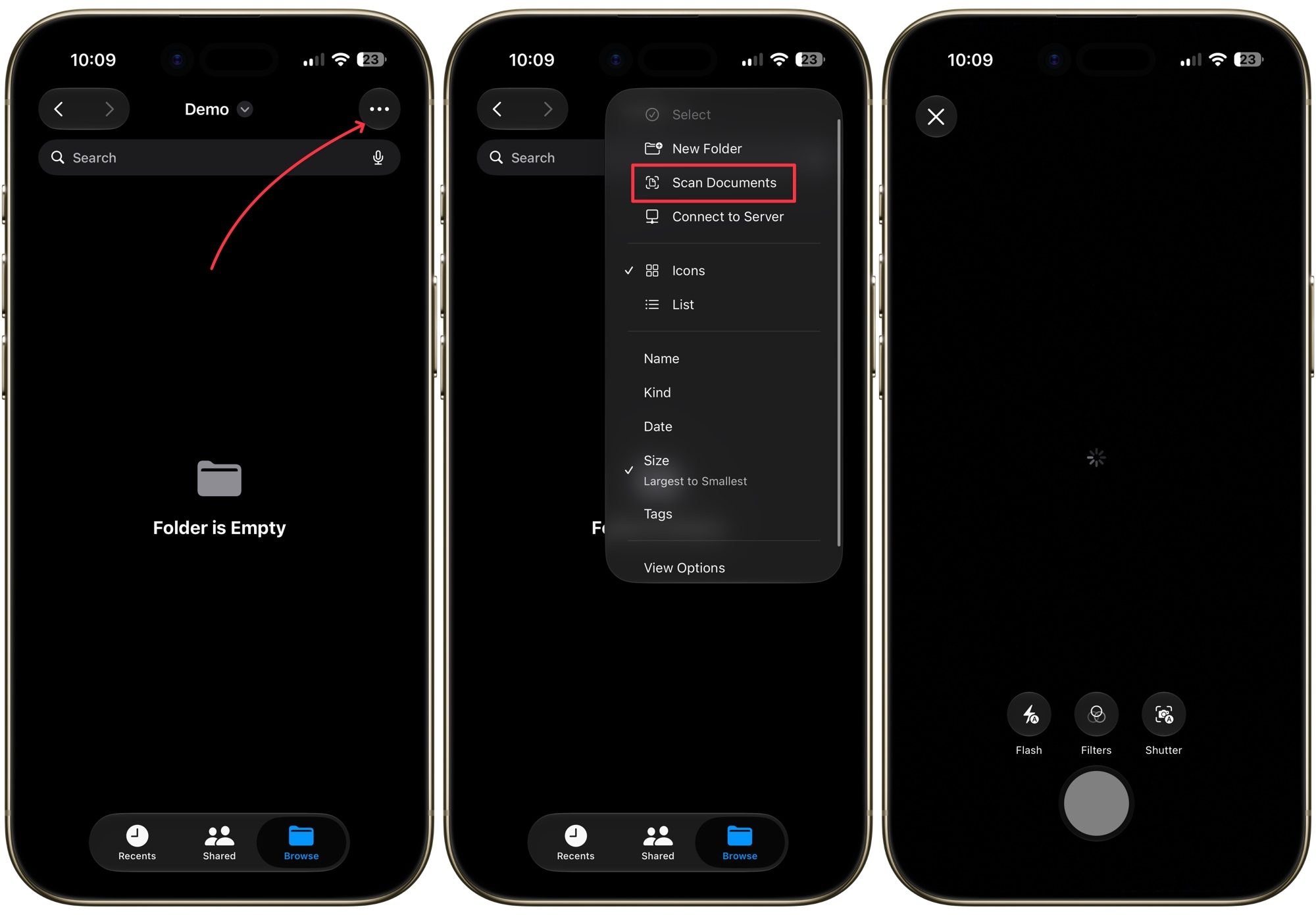
scanning documents inside a folder

Scanning documents is easy

Personally, I use the Files app to scan and save invoices and documents. Each type of document has its own folder, so everything is neatly organized and I can quickly find them. If you have been paying for a third-party app until now, I highly recommend you try the native option and see if you can remove a subscription from your list.

Share. Facebook Twitter Pinterest LinkedIn Telegram Reddit Email
Previous ArticlePuerto Rico Is Rationing Water. It Could’ve Avoided It by Harvesting Rainwater
Next Article Amazon Can Use Your Twitch Content to Train Its AI—Unless You Opt Out

Related Articles

Amazon Can Use Your Twitch Content to Train Its AI—Unless You Opt Out

Amazon Can Use Your Twitch Content to Train Its AI—Unless You Opt Out

15 August 2026
Puerto Rico Is Rationing Water. It Could’ve Avoided It by Harvesting Rainwater

Puerto Rico Is Rationing Water. It Could’ve Avoided It by Harvesting Rainwater

15 August 2026
I switched from Windows to Mac after 25 years, and it’s the trackpad that converted me.

I switched from Windows to Mac after 25 years, and it’s the trackpad that converted me.

15 August 2026
Zyzz Was the Original Looksmaxxer. His Rise and Untimely Death Feel More Relevant Than Ever

Zyzz Was the Original Looksmaxxer. His Rise and Untimely Death Feel More Relevant Than Ever

15 August 2026
Apple’s latest refurb drop brings cheaper MacBooks, iPhone 16 Plus, and Apple Watches

Apple’s latest refurb drop brings cheaper MacBooks, iPhone 16 Plus, and Apple Watches

15 August 2026
Review: Auk Mini 2 Indoor Smart Garden

Review: Auk Mini 2 Indoor Smart Garden

15 August 2026
Stay In Touch
  • Facebook
  • Twitter
  • Pinterest
  • Instagram
  • YouTube
  • Vimeo

Subscribe to Updates

Get the latest tech news and updates directly to your inbox.

Don't Miss
You don’t need a document scanning app. Your iPhone has you covered

You don’t need a document scanning app. Your iPhone has you covered

By technologistmag.com15 August 2026

Whether you are trying to keep your invoices organized for tax season or just want…

Puerto Rico Is Rationing Water. It Could’ve Avoided It by Harvesting Rainwater

Puerto Rico Is Rationing Water. It Could’ve Avoided It by Harvesting Rainwater

15 August 2026
I switched from Windows to Mac after 25 years, and it’s the trackpad that converted me.

I switched from Windows to Mac after 25 years, and it’s the trackpad that converted me.

15 August 2026
Zyzz Was the Original Looksmaxxer. His Rise and Untimely Death Feel More Relevant Than Ever

Zyzz Was the Original Looksmaxxer. His Rise and Untimely Death Feel More Relevant Than Ever

15 August 2026
Apple’s latest refurb drop brings cheaper MacBooks, iPhone 16 Plus, and Apple Watches

Apple’s latest refurb drop brings cheaper MacBooks, iPhone 16 Plus, and Apple Watches

15 August 2026
Technologist Mag
Facebook X (Twitter) Instagram Pinterest
  • Privacy
  • Terms
  • Advertise
  • Contact
© 2026 Technologist Mag. All Rights Reserved.

Type above and press Enter to search. Press Esc to cancel.