

Technologist Mag
  • Home
  • Tech News
  • AI
  • Apps
  • Gadgets
  • Gaming
  • Guides
  • Laptops
  • Mobiles
  • Wearables
  • More
    • Web Stories
    • Trending
    • Press Release

Subscribe to Updates

Get the latest tech news and updates directly to your inbox.

What's On
Review: Alienware 5K OLED Ultrawide Gaming Monitor

Review: Alienware 5K OLED Ultrawide Gaming Monitor

27 August 2026
Plaud One AI earbuds can remember conversations and help get the work done afterwards.

Plaud One AI earbuds can remember conversations and help get the work done afterwards.

27 August 2026
Submit Your Questions: The Great Data Center Backlash

Submit Your Questions: The Great Data Center Backlash

27 August 2026
Windows 11 may soon let you shut down your PC from your phone

Windows 11 may soon let you shut down your PC from your phone

27 August 2026
The Best Posture Correctors to Fix Your Slouch

The Best Posture Correctors to Fix Your Slouch

27 August 2026
Facebook X (Twitter) Instagram
Technologist Mag
SUBSCRIBE
  • Home
  • Tech News
  • AI
  • Apps
  • Gadgets
  • Gaming
  • Guides
  • Laptops
  • Mobiles
  • Wearables
  • More
    • Web Stories
    • Trending
    • Press Release
Technologist Mag
Home » Windows 11 may soon let you shut down your PC from your phone
Tech News

Windows 11 may soon let you shut down your PC from your phone

By technologistmag.com27 August 20263 Mins Read
Windows 11 may soon let you shut down your PC from your phone
Share
Facebook Twitter Reddit Telegram Pinterest Email

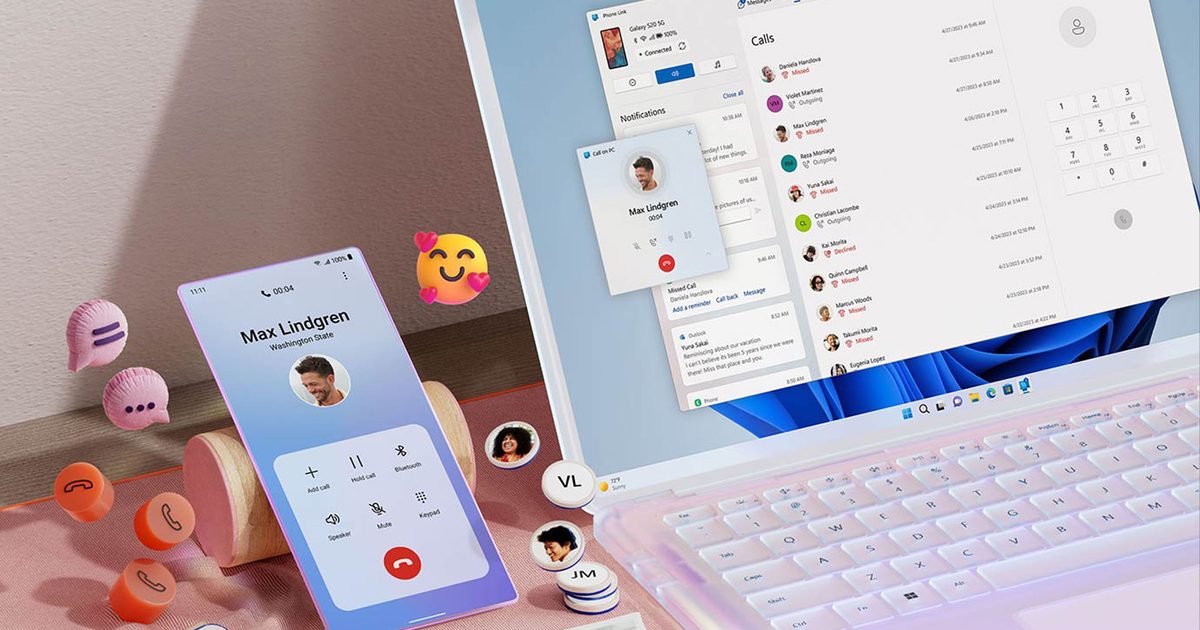
Microsoft has been working on making Phone Link a bigger part of Windows 11, and one of its latest additions could also be one of the most useful.

The company appears to be testing new remote power controls for the Link to Windows app on Android. These would allow users to shut down or restart a connected Windows 11 PC directly from their phone, alongside options for sleep and installing pending updates before restarting or shutting down.

For anyone who has left their PC running after leaving home, this could be a very handy addition.

Your phone could become a remote for your PC

Phone Link already allows Android users to access messages, calls, notifications, photos, and files from a Windows PC. Microsoft has also been working on deeper smartphone integration with Windows 11, including more phone information in the Start menu and additional controls in the system tray.

The new power options would work in the other direction, giving the phone more control over the PC. Restart and shutdown are the obvious additions, but the option to install a pending Windows update before doing either could also save some time and frustration.

Microsoft also appears to be adding confirmation messages before some commands are carried out. Restarting or shutting down a PC could cause unsaved work to be lost, while putting the computer to sleep would disconnect it from the phone until someone wakes it again.

This is one feature I could actually use

Microsoft has added plenty of cross-device features to Phone Link over the years, but remote shutdown is one of the easiest for me to see myself using regularly. I have left home in a hurry more than once and realized hours later that my PC was still running. Being able to open Link to Windows and shut it down from wherever I am would solve that problem in a few seconds.

It also fits nicely with Microsoft’s wider push to make Android phones work more closely with Windows 11. Some of the company’s other ideas, including better clipboard syncing and deeper phone controls inside Windows, could make the two devices feel more connected. Remote power controls are much simpler, but they are also immediately useful.

The feature has not reached users yet. Windows Latest found the controls inside an August 25 build of Link to Windows, where they are currently disabled. Microsoft has not announced when, or if they will roll out the feature publicly.

Share. Facebook Twitter Pinterest LinkedIn Telegram Reddit Email
Previous ArticleThe Best Posture Correctors to Fix Your Slouch
Next Article Submit Your Questions: The Great Data Center Backlash

Related Articles

Review: Alienware 5K OLED Ultrawide Gaming Monitor

Review: Alienware 5K OLED Ultrawide Gaming Monitor

27 August 2026
Plaud One AI earbuds can remember conversations and help get the work done afterwards.

Plaud One AI earbuds can remember conversations and help get the work done afterwards.

27 August 2026
Submit Your Questions: The Great Data Center Backlash

Submit Your Questions: The Great Data Center Backlash

27 August 2026
The Best Posture Correctors to Fix Your Slouch

The Best Posture Correctors to Fix Your Slouch

27 August 2026
Cyberpunk 2077 is giving Samsung’s glasses-free 3D gaming monitor a much-needed boost

Cyberpunk 2077 is giving Samsung’s glasses-free 3D gaming monitor a much-needed boost

27 August 2026
Stop Touching Your Keyboard. Use This AI-Powered Microphone Instead

Stop Touching Your Keyboard. Use This AI-Powered Microphone Instead

27 August 2026
Stay In Touch
  • Facebook
  • Twitter
  • Pinterest
  • Instagram
  • YouTube
  • Vimeo

Subscribe to Updates

Get the latest tech news and updates directly to your inbox.

Don't Miss
Plaud One AI earbuds can remember conversations and help get the work done afterwards.

Plaud One AI earbuds can remember conversations and help get the work done afterwards.

By technologistmag.com27 August 2026

For years now, AI has been trying to make itself more useful at the very…

Submit Your Questions: The Great Data Center Backlash

Submit Your Questions: The Great Data Center Backlash

27 August 2026
Windows 11 may soon let you shut down your PC from your phone

Windows 11 may soon let you shut down your PC from your phone

27 August 2026
The Best Posture Correctors to Fix Your Slouch

The Best Posture Correctors to Fix Your Slouch

27 August 2026
Cyberpunk 2077 is giving Samsung’s glasses-free 3D gaming monitor a much-needed boost

Cyberpunk 2077 is giving Samsung’s glasses-free 3D gaming monitor a much-needed boost

27 August 2026
Technologist Mag
Facebook X (Twitter) Instagram Pinterest
  • Privacy
  • Terms
  • Advertise
  • Contact
© 2026 Technologist Mag. All Rights Reserved.

Type above and press Enter to search. Press Esc to cancel.