




Technologist Mag
  • Home
  • Tech News
  • AI
  • Apps
  • Gadgets
  • Gaming
  • Guides
  • Laptops
  • Mobiles
  • Wearables
  • More
    • Web Stories
    • Trending
    • Press Release

Subscribe to Updates

Get the latest tech news and updates directly to your inbox.

What's On
George Santos Just Got Hit With Kalshi’s First-Ever Lifetime Ban

George Santos Just Got Hit With Kalshi’s First-Ever Lifetime Ban

31 August 2026
EXCLUSIVE: Just Play Dead director Martin Campbell and writer Dan Gordon on Samuel L. Jackson and Eva Green’s twisted thriller

EXCLUSIVE: Just Play Dead director Martin Campbell and writer Dan Gordon on Samuel L. Jackson and Eva Green’s twisted thriller

31 August 2026
JBL thinks the future of gaming audio is smarter, not just wireless

JBL thinks the future of gaming audio is smarter, not just wireless

31 August 2026
Time Doesn’t Heal All Wounds

Time Doesn’t Heal All Wounds

31 August 2026
Samsung Galaxy S27 Ultra could trade 5x zoom for a much bigger telephoto sensor

Samsung Galaxy S27 Ultra could trade 5x zoom for a much bigger telephoto sensor

31 August 2026
Facebook X (Twitter) Instagram
Technologist Mag
SUBSCRIBE
  • Home
  • Tech News
  • AI
  • Apps
  • Gadgets
  • Gaming
  • Guides
  • Laptops
  • Mobiles
  • Wearables
  • More
    • Web Stories
    • Trending
    • Press Release
Technologist Mag
Home » WhatsApp’s next iPhone update could make searching chats much easier
Tech News

WhatsApp’s next iPhone update could make searching chats much easier

By technologistmag.com10 August 20262 Mins Read
WhatsApp’s next iPhone update could make searching chats much easier
Share
Facebook Twitter Reddit Telegram Pinterest Email

Searching for an old message in a busy WhatsApp chat has always felt like more work than it should be, especially on an iPhone. WhatsApp is finally fixing that with a new button that lets you jump into search mode without ever leaving the conversation.

How do you search for a message on WhatsApp right now?

On iPhone, finding a message inside a chat means digging through menus first. You have to tap the contact or group name at the top to open the chat info screen, then tap the search button from there, which sends you back into the chat with search mode turned on.

While this works, it adds an unnecessary step and hides the search feature, which might not be convenient for everyone to discover. Thankfully, if what WaBetaInfo discovered comes to fruition, users will have a much easier time searching inside a chat conversation. 

What is WhatsApp changing about in-chat search?

According to the WhatsApp beta for iOS 26.31.10.70 on TestFlight, the app is building a dedicated search button that lives directly on the chat screen. Instead of hopping over to chat info first, you can tap this button to start searching right away.

The button won’t sit on your screen permanently, though. It only shows up when you scroll up through older messages, working a lot like the jump to latest message button already does. Scroll up, and it appears at the bottom-right of the screen. Scroll back down to the latest messages, and it disappears again.
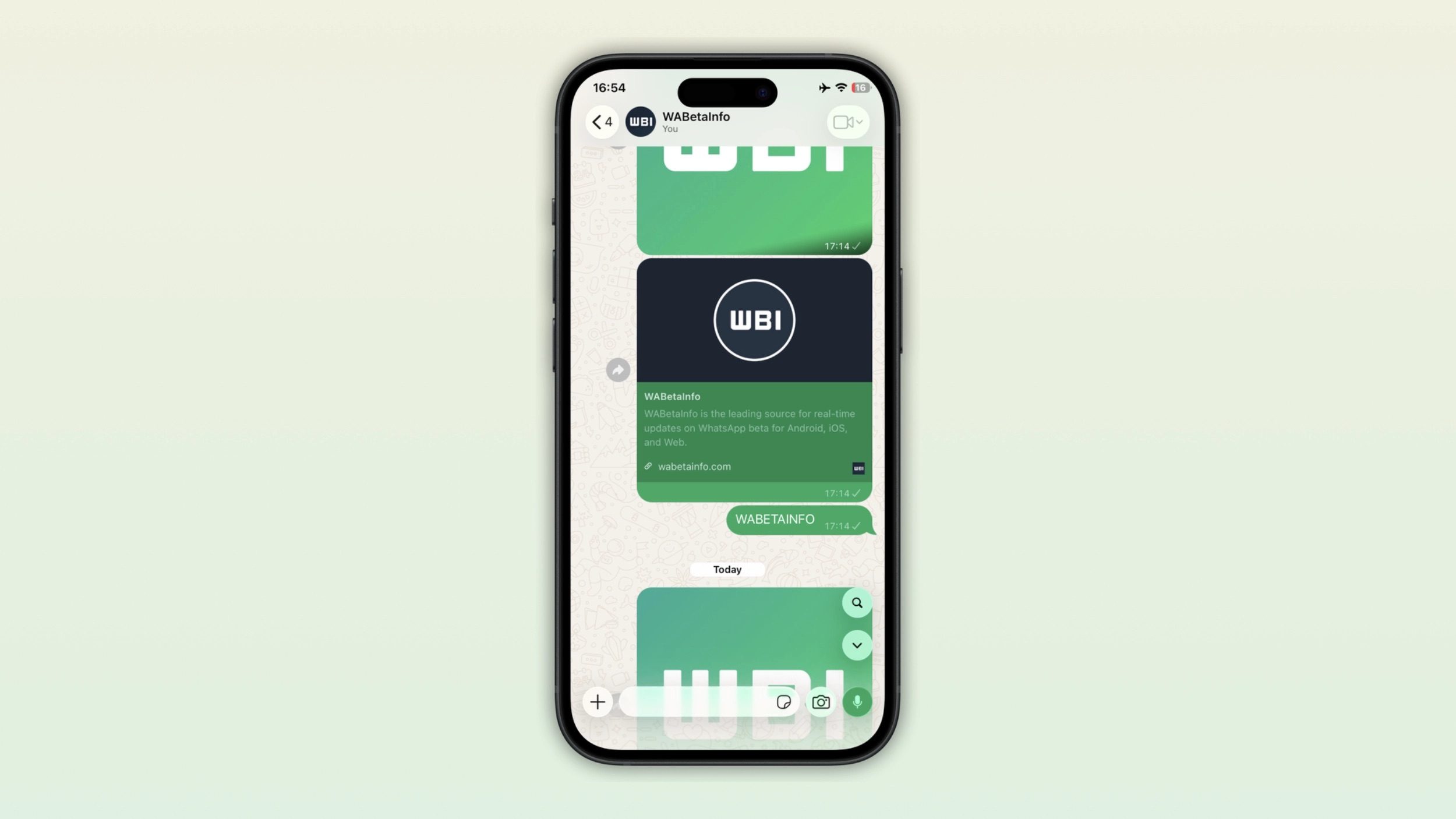
WhatsApp in chat search featurehone

This might sound like a small tweak, but it removes a genuinely annoying detour. Right now, searching means leaving the chat, tapping through a menu, and landing back where you started. The new button cuts all of that down to a single tap.

WhatsApp hasn’t confirmed a release date yet, and the feature is still under development, but it’s a solid sign that faster, in-context search is finally coming for iPhone users.

Share. Facebook Twitter Pinterest LinkedIn Telegram Reddit Email
Previous ArticleGoogle Play users in the US can now pay with Venmo
Next Article Microsoft just found another way to make PCs more expensive, because apparently they weren’t pricey enough

Related Articles

George Santos Just Got Hit With Kalshi’s First-Ever Lifetime Ban

George Santos Just Got Hit With Kalshi’s First-Ever Lifetime Ban

31 August 2026
EXCLUSIVE: Just Play Dead director Martin Campbell and writer Dan Gordon on Samuel L. Jackson and Eva Green’s twisted thriller

EXCLUSIVE: Just Play Dead director Martin Campbell and writer Dan Gordon on Samuel L. Jackson and Eva Green’s twisted thriller

31 August 2026
JBL thinks the future of gaming audio is smarter, not just wireless

JBL thinks the future of gaming audio is smarter, not just wireless

31 August 2026
Samsung Galaxy S27 Ultra could trade 5x zoom for a much bigger telephoto sensor

Samsung Galaxy S27 Ultra could trade 5x zoom for a much bigger telephoto sensor

31 August 2026
The Best MagSafe Phone Grips

The Best MagSafe Phone Grips

31 August 2026
NASA’s new telescope can see 100 times more sky than Hubble in a single shot

NASA’s new telescope can see 100 times more sky than Hubble in a single shot

31 August 2026
Stay In Touch
  • Facebook
  • Twitter
  • Pinterest
  • Instagram
  • YouTube
  • Vimeo

Subscribe to Updates

Get the latest tech news and updates directly to your inbox.

Don't Miss
EXCLUSIVE: Just Play Dead director Martin Campbell and writer Dan Gordon on Samuel L. Jackson and Eva Green’s twisted thriller

EXCLUSIVE: Just Play Dead director Martin Campbell and writer Dan Gordon on Samuel L. Jackson and Eva Green’s twisted thriller

By technologistmag.com31 August 2026

Samuel L. Jackson and Eva Green try to kill each other in their new action-thriller,…

JBL thinks the future of gaming audio is smarter, not just wireless

JBL thinks the future of gaming audio is smarter, not just wireless

31 August 2026
Time Doesn’t Heal All Wounds

Time Doesn’t Heal All Wounds

31 August 2026
Samsung Galaxy S27 Ultra could trade 5x zoom for a much bigger telephoto sensor

Samsung Galaxy S27 Ultra could trade 5x zoom for a much bigger telephoto sensor

31 August 2026
PlayStation Schedules Back-To-Back State of Plays For Thursday

PlayStation Schedules Back-To-Back State of Plays For Thursday

31 August 2026
Technologist Mag
Facebook X (Twitter) Instagram Pinterest
  • Privacy
  • Terms
  • Advertise
  • Contact
© 2026 Technologist Mag. All Rights Reserved.

Type above and press Enter to search. Press Esc to cancel.