


Technologist Mag
  • Home
  • Tech News
  • AI
  • Apps
  • Gadgets
  • Gaming
  • Guides
  • Laptops
  • Mobiles
  • Wearables
  • More
    • Web Stories
    • Trending
    • Press Release

Subscribe to Updates

Get the latest tech news and updates directly to your inbox.

What's On
Madison Square Garden Kept a List of Gay Celebrities

Madison Square Garden Kept a List of Gay Celebrities

9 July 2026
Fraimic’s E Ink art frame generates art from your voice and looks incredible doing it

Fraimic’s E Ink art frame generates art from your voice and looks incredible doing it

9 July 2026
OpenAI’s CEO of AGI Deployment, Fidji Simo, Is Stepping Down

OpenAI’s CEO of AGI Deployment, Fidji Simo, Is Stepping Down

9 July 2026
This open-source Mac app finds the junk files your deleted apps leave behind

This open-source Mac app finds the junk files your deleted apps leave behind

9 July 2026
Come to Our WIRED@NIGHT02 Film Screening!

Come to Our WIRED@NIGHT02 Film Screening!

9 July 2026
Facebook X (Twitter) Instagram
Technologist Mag
SUBSCRIBE
  • Home
  • Tech News
  • AI
  • Apps
  • Gadgets
  • Gaming
  • Guides
  • Laptops
  • Mobiles
  • Wearables
  • More
    • Web Stories
    • Trending
    • Press Release
Technologist Mag
Home » This open-source Mac app finds the junk files your deleted apps leave behind
Tech News

This open-source Mac app finds the junk files your deleted apps leave behind

By technologistmag.com9 July 20262 Mins Read
This open-source Mac app finds the junk files your deleted apps leave behind
Share
Facebook Twitter Reddit Telegram Pinterest Email

Uninstalling apps on macOS is usually very easy. You drag an app to the Trash, empty it, and move on. The annoying part is that many apps still leave residue behind, including support files, caches, preferences, containers, and logs. I have always found that frustrating, especially when old app data keeps sitting around long after the app itself is gone.

AppCleaner by FreeMacSoft has been the popular go-to option for this for years, and it still does the job well. But I recently came across a new open-source alternative called Uninstally by Codenta, which solves the same basic problem. It removes Mac apps along with the support files, caches, preferences, containers, logs, and other leftovers they usually leave behind.

How does Uninstally work?

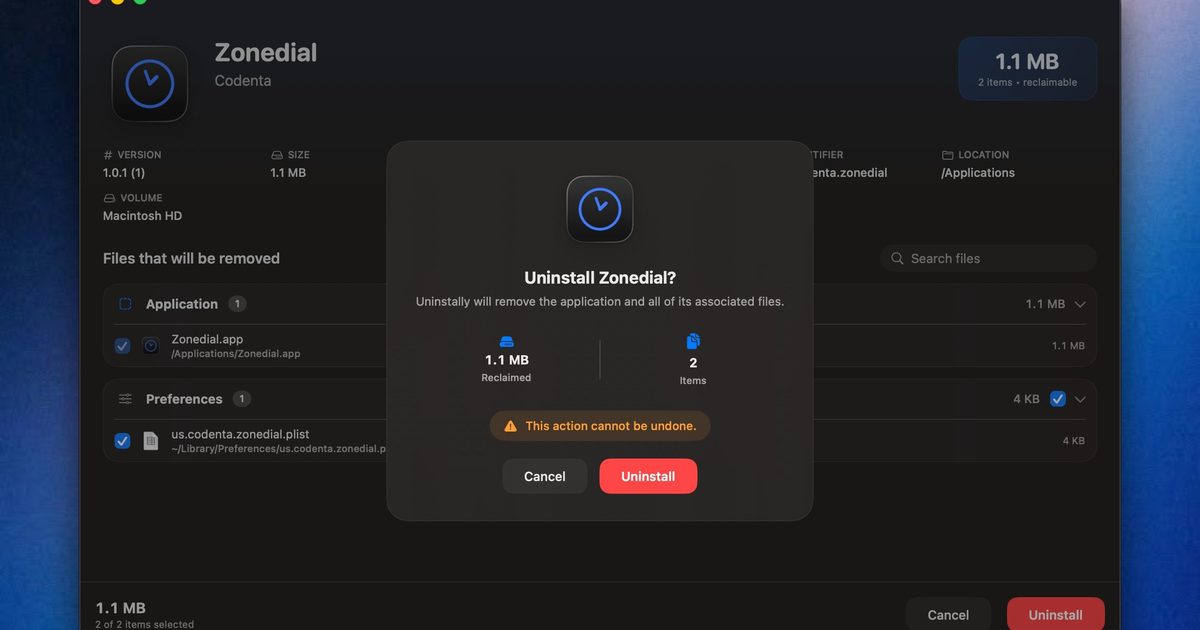
Uninstally can be used directly from Finder. Once its Finder extension is enabled, you can right-click any .app bundle and choose “Uninstall with Uninstally.” The app then opens a confirmation window instead of making you start from a separate app browser.

The cleaner part is how it finds related files. Uninstally uses the app’s bundle identifier and helper namespaces to match leftover items across the Library hierarchy, rather than just looking for folders with the same name. Before anything is removed, it shows the app name, icon, reclaimable storage, item count, and lets you review or deselect matched files.

What else makes it useful?

There is also a standalone app browser for a more deliberate cleanup. You can search installed apps, switch between grid and list views, and filter by largest apps, recently installed apps, never opened apps, broken installs, duplicated apps, and apps with leftovers.

Computer, Electronics, Pc

Uninstally also includes a leftover scanner for apps you have already removed. Instead of digging through Library folders manually, you can scan for orphaned support files, caches, containers, preferences, logs, and old installers in one place.

It also supports Homebrew casks and formulae, shows dependency relationships, and can remove Homebrew leftovers through optional zap cleanup. User-domain files are moved to the Trash, while privileged items require an administrator prompt. You can download Uninstally from Codenta’s website or its GitHub repo.

Share. Facebook Twitter Pinterest LinkedIn Telegram Reddit Email
Previous ArticleCome to Our WIRED@NIGHT02 Film Screening!
Next Article OpenAI’s CEO of AGI Deployment, Fidji Simo, Is Stepping Down

Related Articles

Madison Square Garden Kept a List of Gay Celebrities

Madison Square Garden Kept a List of Gay Celebrities

9 July 2026
Fraimic’s E Ink art frame generates art from your voice and looks incredible doing it

Fraimic’s E Ink art frame generates art from your voice and looks incredible doing it

9 July 2026
OpenAI’s CEO of AGI Deployment, Fidji Simo, Is Stepping Down

OpenAI’s CEO of AGI Deployment, Fidji Simo, Is Stepping Down

9 July 2026
Come to Our WIRED@NIGHT02 Film Screening!

Come to Our WIRED@NIGHT02 Film Screening!

9 July 2026
Sony returns to the professional IEM market with the IER-M500

Sony returns to the professional IEM market with the IER-M500

9 July 2026
Maine’s Senate Race Implodes, Meta’s Threads Rivals Musk’s X, and the Trump Phone Arrives

Maine’s Senate Race Implodes, Meta’s Threads Rivals Musk’s X, and the Trump Phone Arrives

9 July 2026
Stay In Touch
  • Facebook
  • Twitter
  • Pinterest
  • Instagram
  • YouTube
  • Vimeo

Subscribe to Updates

Get the latest tech news and updates directly to your inbox.

Don't Miss
Fraimic’s E Ink art frame generates art from your voice and looks incredible doing it

Fraimic’s E Ink art frame generates art from your voice and looks incredible doing it

By technologistmag.com9 July 2026

We’ve seen a lot of “smart art frames” at CES over the years. Most of…

OpenAI’s CEO of AGI Deployment, Fidji Simo, Is Stepping Down

OpenAI’s CEO of AGI Deployment, Fidji Simo, Is Stepping Down

9 July 2026
This open-source Mac app finds the junk files your deleted apps leave behind

This open-source Mac app finds the junk files your deleted apps leave behind

9 July 2026
Come to Our WIRED@NIGHT02 Film Screening!

Come to Our WIRED@NIGHT02 Film Screening!

9 July 2026
Sony returns to the professional IEM market with the IER-M500

Sony returns to the professional IEM market with the IER-M500

9 July 2026
Technologist Mag
Facebook X (Twitter) Instagram Pinterest
  • Privacy
  • Terms
  • Advertise
  • Contact
© 2026 Technologist Mag. All Rights Reserved.

Type above and press Enter to search. Press Esc to cancel.