



Technologist Mag
  • Home
  • Tech News
  • AI
  • Apps
  • Gadgets
  • Gaming
  • Guides
  • Laptops
  • Mobiles
  • Wearables
  • More
    • Web Stories
    • Trending
    • Press Release

Subscribe to Updates

Get the latest tech news and updates directly to your inbox.

What's On
Anthropic Flags Gas Supply as One of Its Biggest Near-Term Risks

Anthropic Flags Gas Supply as One of Its Biggest Near-Term Risks

27 October 2026
M6 vs. M5 MacBook Pro (14-inch): Should M5 owners even bother?

M6 vs. M5 MacBook Pro (14-inch): Should M5 owners even bother?

27 October 2026
Phantom Blade Zero Review: Wuxian Wonder Abounds

Phantom Blade Zero Review: Wuxian Wonder Abounds

27 October 2026
Motorola Deal: Get a Free Smartwatch and Earbuds When You Buy a Razr

Motorola Deal: Get a Free Smartwatch and Earbuds When You Buy a Razr

27 October 2026
An AI-generated movie flopped in China despite its budget and Hollywood must take notes

An AI-generated movie flopped in China despite its budget and Hollywood must take notes

27 October 2026
Facebook X (Twitter) Instagram
Technologist Mag
SUBSCRIBE
  • Home
  • Tech News
  • AI
  • Apps
  • Gadgets
  • Gaming
  • Guides
  • Laptops
  • Mobiles
  • Wearables
  • More
    • Web Stories
    • Trending
    • Press Release
Technologist Mag
Home » The sideloading workaround Google promised months ago is finally rolling out
Tech News

The sideloading workaround Google promised months ago is finally rolling out

By technologistmag.com19 August 20262 Mins Read
The sideloading workaround Google promised months ago is finally rolling out
Share
Facebook Twitter Reddit Telegram Pinterest Email

Google is finally rolling out the advanced sideloading flow it first teased back in March, giving power users a way to install apps from unverified developers on certified devices without touching ADB.

Back then, Google started asking developers to verify their identity before their apps could land on certified Android devices, no matter if you download them from the Play Store, a third-party store, or sideload them directly. The idea is to tie every app to a real developer ID so scammers can’t easily sneak malware onto your phone.

What do you have to do to use the advanced flow?

Not every developer will want to verify themselves, so Google built this advanced flow for people who still want that freedom. You’ll need to enable it from the hidden Developer options menu, authenticate yourself, restart your phone, and then wait a full 24 hours before you can sideload anything from an unverified source.

Even after clearing all that, Android will still show a warning every time you install or update an app from an unverified developer. You can brush past it by tapping Install anyway, but the extra friction is very much intentional. Google doesn’t want regular users getting tricked into installing something shady.
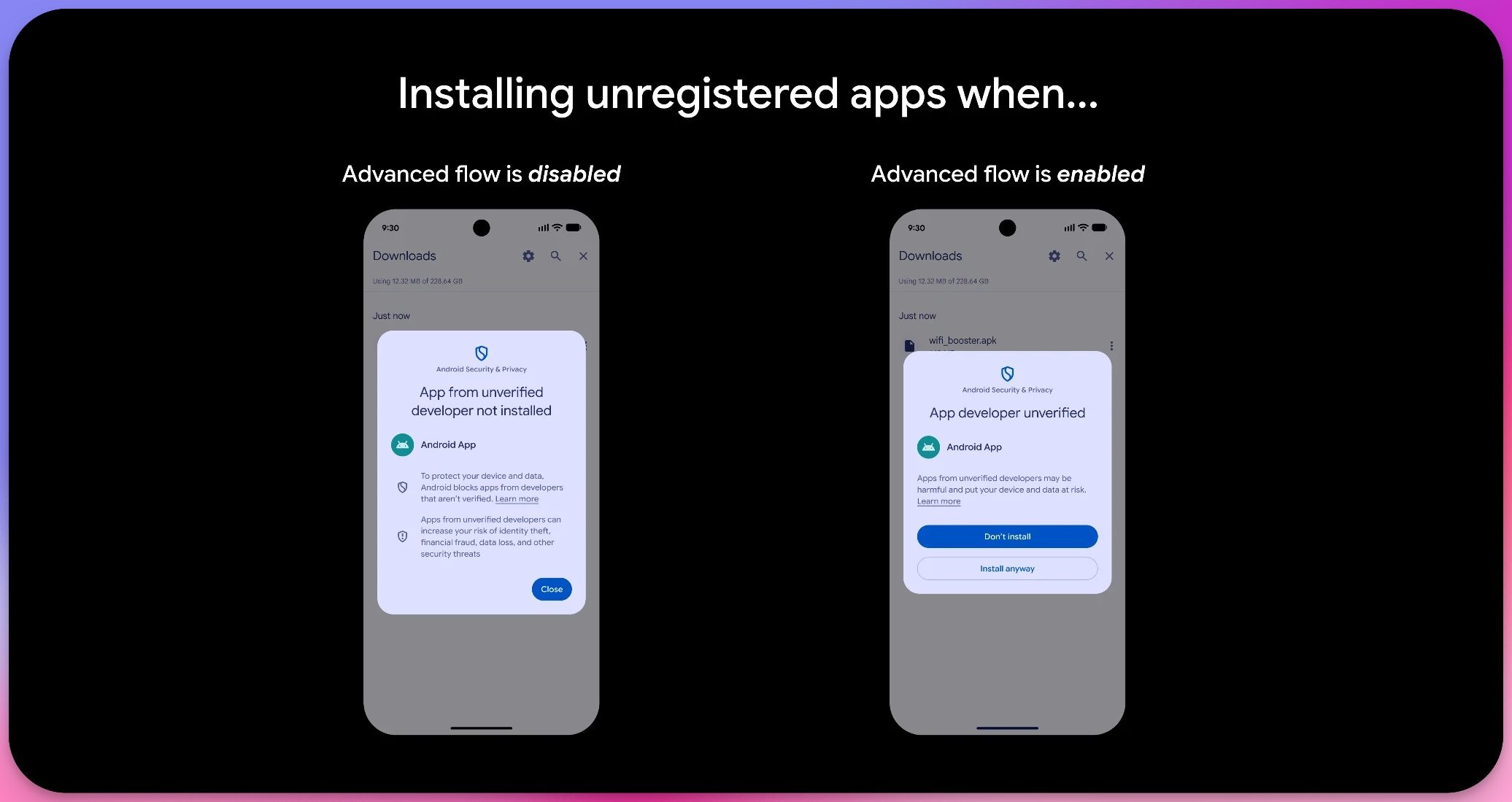
Advanced flow is disabled vs enabled

The good news is you only need to enable this once. Google will remember your choice across all your devices, so you won’t need to repeat the process every time. And if you skip the advanced flow entirely, ADB sideloading still works like before.

When is this actually rolling out?

Don’t expect this to show up on your phone right away. Google needs a new Android Developer Verifier system service running in the background first, and you can grab it manually from the Play Store to boost your odds of getting early access.

As per Mishaal Rahmans’ Reddit post, Google will verify installs from Google Play, Honor App Market, Oppo App Market, Galaxy Store, Palm Store, V-Appstore, and GetApps starting September 30, 2026. This year, enforcement is limited to Brazil, Indonesia, Singapore, and Thailand, with a full global rollout planned for 2027.

Share. Facebook Twitter Pinterest LinkedIn Telegram Reddit Email
Previous ArticleTides Of Annihilation – Aug 19, 2026
Next Article ‘Your Excel Skills Suck’: The Power Users Turning Spreadsheets Into a Spectator Sport

Related Articles

Anthropic Flags Gas Supply as One of Its Biggest Near-Term Risks

Anthropic Flags Gas Supply as One of Its Biggest Near-Term Risks

27 October 2026
M6 vs. M5 MacBook Pro (14-inch): Should M5 owners even bother?

M6 vs. M5 MacBook Pro (14-inch): Should M5 owners even bother?

27 October 2026
Motorola Deal: Get a Free Smartwatch and Earbuds When You Buy a Razr

Motorola Deal: Get a Free Smartwatch and Earbuds When You Buy a Razr

27 October 2026
An AI-generated movie flopped in China despite its budget and Hollywood must take notes

An AI-generated movie flopped in China despite its budget and Hollywood must take notes

27 October 2026
Anthropic Says It Will Revolutionize Biology—Some Day

Anthropic Says It Will Revolutionize Biology—Some Day

27 October 2026
From budget PCs to AI workstations, ACEMAGIC has great deals worth checking out

From budget PCs to AI workstations, ACEMAGIC has great deals worth checking out

27 October 2026
Stay In Touch
  • Facebook
  • Twitter
  • Pinterest
  • Instagram
  • YouTube
  • Vimeo

Subscribe to Updates

Get the latest tech news and updates directly to your inbox.

Don't Miss
M6 vs. M5 MacBook Pro (14-inch): Should M5 owners even bother?

M6 vs. M5 MacBook Pro (14-inch): Should M5 owners even bother?

By technologistmag.com27 October 2026

I’ve spent a good amount of time digging into the spec sheet of the new…

Phantom Blade Zero Review: Wuxian Wonder Abounds

Phantom Blade Zero Review: Wuxian Wonder Abounds

27 October 2026
Motorola Deal: Get a Free Smartwatch and Earbuds When You Buy a Razr

Motorola Deal: Get a Free Smartwatch and Earbuds When You Buy a Razr

27 October 2026
An AI-generated movie flopped in China despite its budget and Hollywood must take notes

An AI-generated movie flopped in China despite its budget and Hollywood must take notes

27 October 2026
Anthropic Says It Will Revolutionize Biology—Some Day

Anthropic Says It Will Revolutionize Biology—Some Day

27 October 2026
Technologist Mag
Facebook X (Twitter) Instagram Pinterest
  • Privacy
  • Terms
  • Advertise
  • Contact
© 2026 Technologist Mag. All Rights Reserved.

Type above and press Enter to search. Press Esc to cancel.