


Technologist Mag
  • Home
  • Tech News
  • AI
  • Apps
  • Gadgets
  • Gaming
  • Guides
  • Laptops
  • Mobiles
  • Wearables
  • More
    • Web Stories
    • Trending
    • Press Release

Subscribe to Updates

Get the latest tech news and updates directly to your inbox.

What's On
A hacker’s arrest just revealed how Microsoft can track your Windows device

A hacker’s arrest just revealed how Microsoft can track your Windows device

7 July 2026
iPhone shortcuts disappearing in silence? iOS 27 just added a way to get them back

iPhone shortcuts disappearing in silence? iOS 27 just added a way to get them back

7 July 2026
Mysterious Compound Detected on Pluto and Titan

Mysterious Compound Detected on Pluto and Titan

7 July 2026
Google confirms Pixel 11 launch event with a tease of its new flagship design

Google confirms Pixel 11 launch event with a tease of its new flagship design

7 July 2026
The Blood of Dawnwalker Preview – Preserve Your Humanity

The Blood of Dawnwalker Preview – Preserve Your Humanity

7 July 2026
Facebook X (Twitter) Instagram
Technologist Mag
SUBSCRIBE
  • Home
  • Tech News
  • AI
  • Apps
  • Gadgets
  • Gaming
  • Guides
  • Laptops
  • Mobiles
  • Wearables
  • More
    • Web Stories
    • Trending
    • Press Release
Technologist Mag
Home » iPhone shortcuts disappearing in silence? iOS 27 just added a way to get them back
Tech News

iPhone shortcuts disappearing in silence? iOS 27 just added a way to get them back

By technologistmag.com7 July 20262 Mins Read
iPhone shortcuts disappearing in silence? iOS 27 just added a way to get them back
Share
Facebook Twitter Reddit Telegram Pinterest Email

If you rely heavily on Apple’s Shortcuts app and use it regularly, there’s a decent chance some of your automations have quietly vanished without you ever noticing. They probably exist somewhere in iCloud, but aren’t showing up in your library. iOS 27 is finally doing something about it.

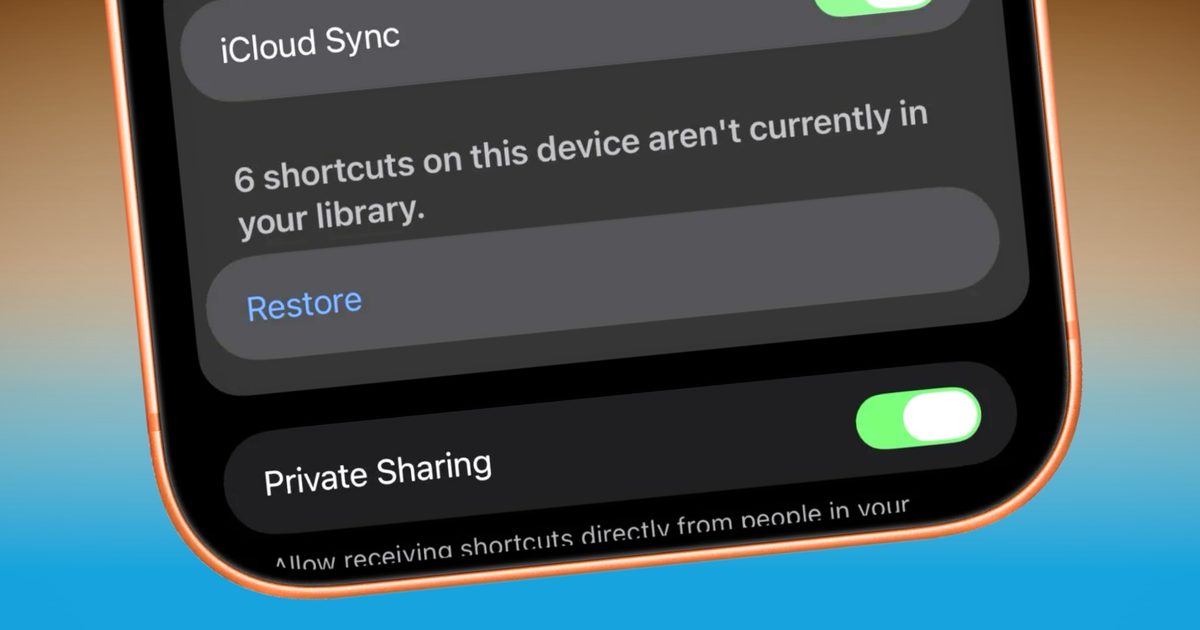
iOS 27’s Beta 3 includes a new Restore button buried in Settings > Apps > Shortcuts. When the system detects automations on your device, ones that aren’t showing up in your library, it displays a counter: “X shortcuts on this device aren’t currently in your library.” 

The restore button solves an infuriating problem

Pressing Restore immediately pulls them all back into your “All Shortcuts” view (unsorted). It doesn’t require fiddling with iCloud menus, manual reimporting, or digging through backups (via Matthew Cassinelli).

For those catching up, the Shortcuts sync problem has been pretty bad. Matthew Cassinelli, one of the most prominent Shortcuts experts around, found over 200 automations waiting to be restored when he tried the new button. Even he had no idea when or how they’d disappeared from his library.

Some showed up as duplicates, indicated by a “1” appended to the name, a telltale sign of iCloud sync conflicts. To be fair, Cassinelli had been adding, deleting, and re-adding what he mentioned, and I quote, “up to 4,000 shortcuts,” so his situation is more extreme than most.

iPhone showing shortcuts app

Why does this matter for regular iPhone users?

The fact that even a power user couldn’t tell that something was missing says a lot about how silently this bug operates and the frustration it causes. 

Most casual Shortcuts users probably won’t hit this. Still, anyone who has built out a meaningful library, morning routines, home automation triggers, Focus Mode configurations, and workflows has been flying without a safety net for years.

A sync hiccup occurs, automations disappear, and there’s been no official way to recover them other than rebuilding from scratch. Having a restore function on the operating system’s level changes that completely.

Share. Facebook Twitter Pinterest LinkedIn Telegram Reddit Email
Previous ArticleMysterious Compound Detected on Pluto and Titan
Next Article A hacker’s arrest just revealed how Microsoft can track your Windows device

Related Articles

A hacker’s arrest just revealed how Microsoft can track your Windows device

A hacker’s arrest just revealed how Microsoft can track your Windows device

7 July 2026
Mysterious Compound Detected on Pluto and Titan

Mysterious Compound Detected on Pluto and Titan

7 July 2026
Google confirms Pixel 11 launch event with a tease of its new flagship design

Google confirms Pixel 11 launch event with a tease of its new flagship design

7 July 2026
Apple may be making the iPhone 18 Pro thicker for a serious camera upgrade

Apple may be making the iPhone 18 Pro thicker for a serious camera upgrade

7 July 2026
Shut Those Laptops! Anthropic Puts Its Claude Cowork Agent on Your Phone

Shut Those Laptops! Anthropic Puts Its Claude Cowork Agent on Your Phone

7 July 2026
Claude Cowork can now keep working even after you close your laptop

Claude Cowork can now keep working even after you close your laptop

7 July 2026
Stay In Touch
  • Facebook
  • Twitter
  • Pinterest
  • Instagram
  • YouTube
  • Vimeo

Subscribe to Updates

Get the latest tech news and updates directly to your inbox.

Don't Miss
iPhone shortcuts disappearing in silence? iOS 27 just added a way to get them back

iPhone shortcuts disappearing in silence? iOS 27 just added a way to get them back

By technologistmag.com7 July 2026

If you rely heavily on Apple’s Shortcuts app and use it regularly, there’s a decent…

Mysterious Compound Detected on Pluto and Titan

Mysterious Compound Detected on Pluto and Titan

7 July 2026
Google confirms Pixel 11 launch event with a tease of its new flagship design

Google confirms Pixel 11 launch event with a tease of its new flagship design

7 July 2026
The Blood of Dawnwalker Preview – Preserve Your Humanity

The Blood of Dawnwalker Preview – Preserve Your Humanity

7 July 2026
Apple may be making the iPhone 18 Pro thicker for a serious camera upgrade

Apple may be making the iPhone 18 Pro thicker for a serious camera upgrade

7 July 2026
Technologist Mag
Facebook X (Twitter) Instagram Pinterest
  • Privacy
  • Terms
  • Advertise
  • Contact
© 2026 Technologist Mag. All Rights Reserved.

Type above and press Enter to search. Press Esc to cancel.