
Technologist Mag
  • Home
  • Tech News
  • AI
  • Apps
  • Gadgets
  • Gaming
  • Guides
  • Laptops
  • Mobiles
  • Wearables
  • More
    • Web Stories
    • Trending
    • Press Release

Subscribe to Updates

Get the latest tech news and updates directly to your inbox.

What's On
HBO Max Promo Code: 50% Off | November 2026

HBO Max Promo Code: 50% Off | November 2026

20 November 2026
Google’s desktop homepage now keeps your AI Mode chats on the left

Google’s desktop homepage now keeps your AI Mode chats on the left

20 November 2026
Google built a fake internet so Chrome’s AI doesn’t break your real one

Google built a fake internet so Chrome’s AI doesn’t break your real one

20 November 2026
Meta is betting you’ll pay 0 to carry Muse in your pocket

Meta is betting you’ll pay $300 to carry Muse in your pocket

19 November 2026
Fiona the Hippo Died After Eating a Hat. But How Does a Hat Kill a Hippo?

Fiona the Hippo Died After Eating a Hat. But How Does a Hat Kill a Hippo?

19 November 2026
Facebook X (Twitter) Instagram
Technologist Mag
SUBSCRIBE
  • Home
  • Tech News
  • AI
  • Apps
  • Gadgets
  • Gaming
  • Guides
  • Laptops
  • Mobiles
  • Wearables
  • More
    • Web Stories
    • Trending
    • Press Release
Technologist Mag
Home » Here’s The Best Graphics And Performance Mode For Phantom Blade Zero On PlayStation 5
Gaming

Here’s The Best Graphics And Performance Mode For Phantom Blade Zero On PlayStation 5

By technologistmag.com28 October 20264 Mins Read
Here’s The Best Graphics And Performance Mode For Phantom Blade Zero On PlayStation 5
Share
Facebook Twitter Reddit Telegram Pinterest Email

Phantom Blade Zero is out now for everyone as a console exclusive on PlayStation 5 and on PC via Steam and the Epic Games Store as well. If you missed it, it’s my favorite action game of the year so far, and you can read why in Game Informer’s Phantom Blade Zero review. That explains why I think you should check the game out; Game Informer’s list of Phantom Blade Zero tips and tricks will get you some key information I wish I had when I started the game; and this guide I wrote up about the requirements you need to get the best ending in Phantom Blade Zero will help you find all story-critical content in the game. 

However, you’re looking for advice on which of the three visual modes Phantom Blade Zero offers you should use on your PS5. This here piece is for you. 

Breaking Down Phantom Blade Zero’s Graphics Options

Phantom Blade Zero has three visual modes on PS5 Pro: Quality, Balanced, and Performance. I tested all three. My personal favorite was Balanced, which gives you an upscaled (checkerboarded) 4K resolution at 40 FPS, as long as you have a 120Hz TV with VRR. If you have a 120Hz TV, it likely has VRR because most major manufacturers include it with 120Hz. I like this mode because the upscaled 4K looks beautiful, just a hair less than native 4K, and if you aren’t someone super trained on those details, I’d wager you won’t notice the difference. The best part is that this mode offers 40 FPS gameplay, which, contrary to how math works, is halfway between 30 FPS and 60 FPS; I’m not kidding, look it up. As such, 40 FPS feels much smoother than 30 FPS, and you’re still getting crisp 4K resolution. It’s a win-win for me and my go-to mode when a game offers it. 

That said, if you don’t have a PS5 Pro, you won’t see this Balanced mode. 

The Performance mode offers an upscaled 2K resolution with a pretty locked 60 FPS. Phantom Blade Zero is an extremely fast, fluid action game, so I think many people will want the buttery smoothness of 60 FPS gameplay. If that’s you, pick the Performance mode. Sure, its resolution is lower, and it will look blurrier and less crisp than the other two modes, but if you aren’t switching back and forth often or looking at side-by-side images, you likely won’t notice. 

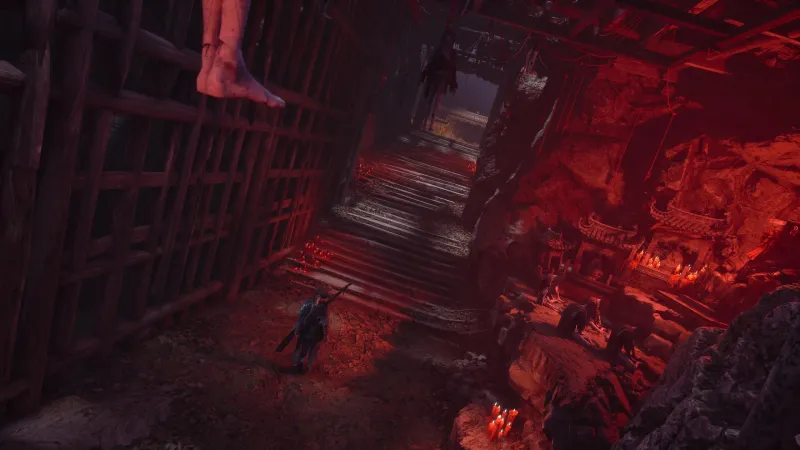
Quality mode is native 4K resolution (absolutely beautiful, the best visual image you can get playing Phantom Blade Zero), but at 30 FPS… and for a game like this, I don’t think 30 FPS does it justice. I don’t really recommend this mode for combat, but if you’re just waltzing around Wulin, grabbing screenshots and such, turn it on and bask in the wonders of developer S-Game’s art team. 

Note: There is an option for ray tracing on PS5 Pro. I tested all three graphics modes with it on and off and noticed zero performance changes or issues. So, use ray tracing – it’s nice! 
Here's The Best Graphics And Performance Mode For Phantom Blade Zero On PlayStation 5

So, to recap: 

  • Quality Mode: Native 4K resolution at 30 FPS
  • Balanced Mode: Upscaled 4K resolution at 40 FPS
  • Performance Mode: Upscaled 2K resolution at 60 FPS

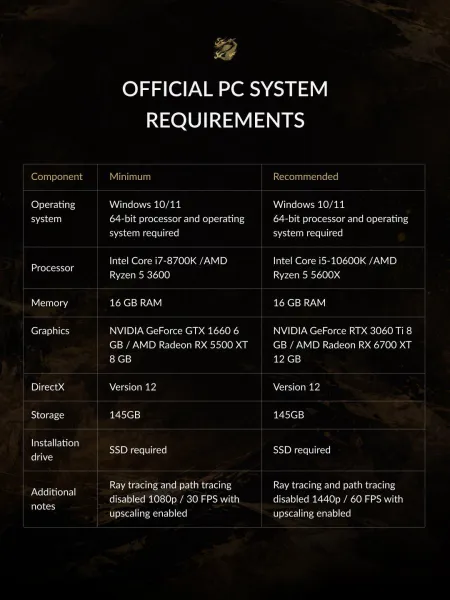
And, in case you missed it, below is an image of the PC system requirements and specs needed to play Phantom Blade Zero on Steam and the Epic Games Store: 
Here's The Best Graphics And Performance Mode For Phantom Blade Zero On PlayStation 5

In the meantime, read Game Informer’s Phantom Blade Zero review, then check out our list of Phantom Blade Zero tips and tricks we wish we knew before starting the game. Then check out our breakdown of the requirements to see the best ending in the game. 
Share. Facebook Twitter Pinterest LinkedIn Telegram Reddit Email
Previous ArticlePlease Let the Internet Die
Next Article Google’s Gemini can now make complex topics more fun with new interactive learning feature

Related Articles

Grand Theft Auto VI’s Auto Drive Is A Beautiful And Free Version Of Hands-Free Travel

Grand Theft Auto VI’s Auto Drive Is A Beautiful And Free Version Of Hands-Free Travel

19 November 2026
Why Do I Want To Paint The Walls In Grand Theft Auto VI?

Why Do I Want To Paint The Walls In Grand Theft Auto VI?

19 November 2026
102 Things That Happened Before GTA VI

102 Things That Happened Before GTA VI

19 November 2026
Rockstar Talks GTAVI’s Jason And Lucia

Rockstar Talks GTAVI’s Jason And Lucia

19 November 2026
Game Informer’s Top Scoring Reviews Of 2026

Game Informer’s Top Scoring Reviews Of 2026

18 November 2026
Grand Theft Auto VI Review: Outrageous Fortune

Grand Theft Auto VI Review: Outrageous Fortune

18 November 2026
Stay In Touch
  • Facebook
  • Twitter
  • Pinterest
  • Instagram
  • YouTube
  • Vimeo

Subscribe to Updates

Get the latest tech news and updates directly to your inbox.

Don't Miss
Google’s desktop homepage now keeps your AI Mode chats on the left

Google’s desktop homepage now keeps your AI Mode chats on the left

By technologistmag.com20 November 2026

Google is currently rolling out a new collapsible left-hand sidebar on the desktop homepage globally,…

Google built a fake internet so Chrome’s AI doesn’t break your real one

Google built a fake internet so Chrome’s AI doesn’t break your real one

20 November 2026
Meta is betting you’ll pay 0 to carry Muse in your pocket

Meta is betting you’ll pay $300 to carry Muse in your pocket

19 November 2026
Fiona the Hippo Died After Eating a Hat. But How Does a Hat Kill a Hippo?

Fiona the Hippo Died After Eating a Hat. But How Does a Hat Kill a Hippo?

19 November 2026
27,000 reasons not to download “GTA VI for PC”

27,000 reasons not to download “GTA VI for PC”

19 November 2026
Technologist Mag
Facebook X (Twitter) Instagram Pinterest
  • Privacy
  • Terms
  • Advertise
  • Contact
© 2026 Technologist Mag. All Rights Reserved.

Type above and press Enter to search. Press Esc to cancel.