
Anyone who’s collaborated on a shared doc knows the horror of opening it to find forty unresolved comments from six different people. Google just handed over the job of sorting through that mess to Gemini.
So what can Gemini actually do with your comments now?
Google Workspace is rolling out four new Gemini-powered comment features in Google Docs. You can ask Gemini to summarize entire comment threads or, even better, pull out unresolved issues by typing a prompt in natural language that says, “What are the unresolved issues based on the comments?”
It can also add comments on your behalf, drafting requests like asking a teammate to verify specific stats. Perhaps the most useful bit is that Gemini can draft contextually grounded replies to open threads, taking care of tasks like confirming approvals or answering questions using files already sitting in Drive.
It can even suggest document edits based on reviewers’ feedback, generating changes for you to review; you can apply those changes with a click. The suggestions surface automatically in the Gemini side panel or bottom bar as you open a document or while you scroll through comments.
Who gets access, and is anything else launching alongside it?
The new Google Doc features are on by default for admins with Gemini for Workspace enabled in Drive, and available to Business Standard and Plus, Enterprise, Education Plus, and Google AI Pro and Ultra subscribers.
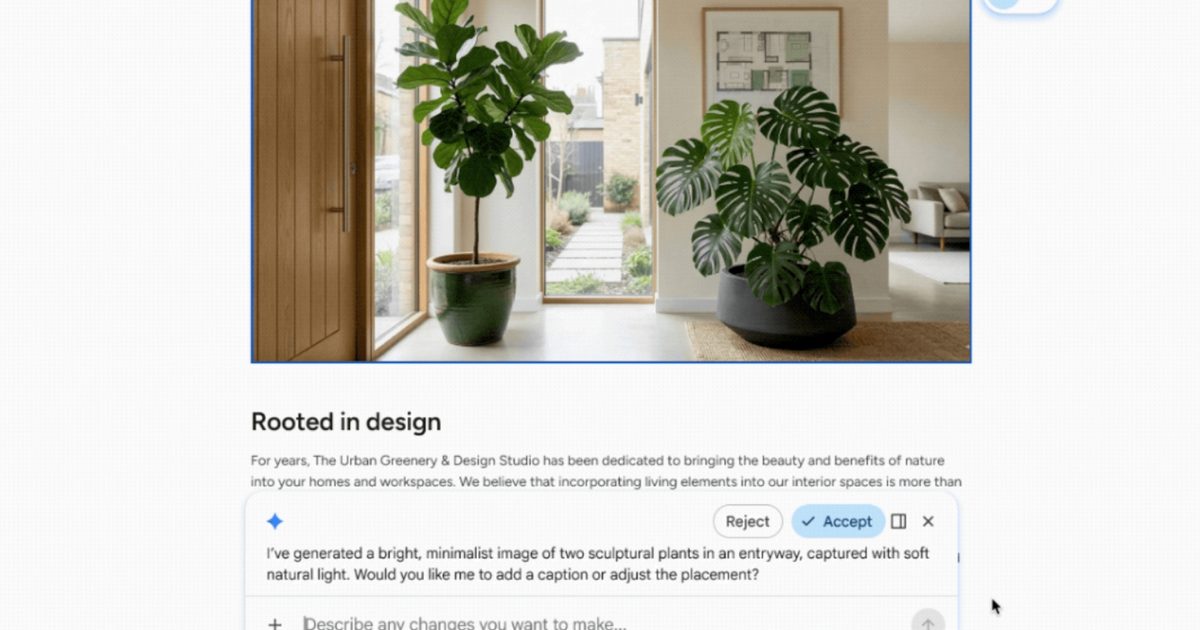
Rollout began this week and should reach all the eligible users within about 15 days. Google also quietly shipped a related upgrade just a day earlier, and I can’t help but mention it. Gemini can now generate and edit images, diagrams, and infographics directly inside Docs.
It uses your document’s content as context and applies consistent styling across multiple visuals with a single natural language prompt. From comment management and visual generation, Google’s clearly betting that fewer people will need to leave Docs entirely to get work done.
Pairing comment management with visual generation in back-to-back rollouts suggests Google is treating Docs less like a text editor and more like a full-fledged workspace hub.