


Technologist Mag
  • Home
  • Tech News
  • AI
  • Apps
  • Gadgets
  • Gaming
  • Guides
  • Laptops
  • Mobiles
  • Wearables
  • More
    • Web Stories
    • Trending
    • Press Release

Subscribe to Updates

Get the latest tech news and updates directly to your inbox.

What's On
The Great Peptide Cash Grab Has Begun

The Great Peptide Cash Grab Has Begun

21 July 2026
Samsung’s new AI assistant wants to explain what your health data actually means

Samsung’s new AI assistant wants to explain what your health data actually means

21 July 2026
Splatoon Raiders Review – A Fresh Take

Splatoon Raiders Review – A Fresh Take

21 July 2026
Halliday’s New Smart Glasses Skip the Camera

Halliday’s New Smart Glasses Skip the Camera

21 July 2026
Apple’s next big iPhone display experiment could be its biggest yet

Apple’s next big iPhone display experiment could be its biggest yet

21 July 2026
Facebook X (Twitter) Instagram
Technologist Mag
SUBSCRIBE
  • Home
  • Tech News
  • AI
  • Apps
  • Gadgets
  • Gaming
  • Guides
  • Laptops
  • Mobiles
  • Wearables
  • More
    • Web Stories
    • Trending
    • Press Release
Technologist Mag
Home » Buying a monitor? This Mac app can expose problems before the return window closes
Tech News

Buying a monitor? This Mac app can expose problems before the return window closes

By technologistmag.com20 July 20262 Mins Read
Buying a monitor? This Mac app can expose problems before the return window closes
Share
Facebook Twitter Reddit Telegram Pinterest Email

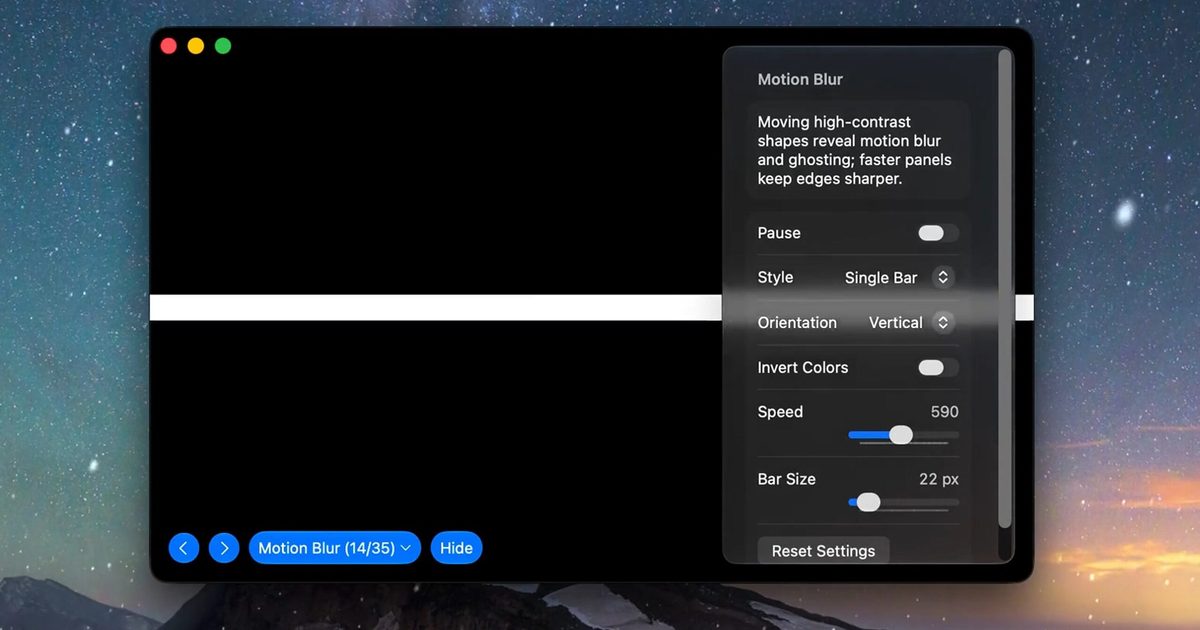
Making a brand-new tech purchase doesn’t always carry the guarantee of a perfectly functioning unit. But a tiny Mac app called Screen Test can help you find a defect before it gets too late. Screen Test (version 1.1) is a native macOS utility containing more than 25 patterns and diagnostic tools for evaluating built-in and external displays. It can help reveal dead or stuck pixels, backlight bleeding, and other issues. The app works completely offline, so you don’t have to rely on browser tabs or an internet connection.

Every pixel gets scrutinized

Screen Test fills the display with carefully selected colors, grids, grayscale steps, and other patterns that make subtle panel defects easier to spot. A solid-color cycle can expose pixels that remain permanently dark or stuck on one color, while uniform gray and black screens can reveal backlight bleed and inconsistent brightness across the panel.

Version 1.1 introduces seven additional tools:

  • An automated dead-pixel cycle
  • A text-resolution chart
  • A motion-blur and ghosting test
  • Customizable solid-color fills
  • Checkerboard contrast patterns
  • Grayscale steps
  • Editable text for evaluating sharpness.

The motion test should prove especially useful when inspecting a gaming monitor, where slow pixel transitions can leave trails behind moving objects. Text patterns can also highlight subpixel rendering or sharpness problems that become obvious during everyday work, even when games and videos appear acceptable.

Four dollars could protect a much larger purchase

Most core features are available free of charge. A $3.99 lifetime purchase unlocks the remaining advanced options, with no recurring subscription. The Mac App Store lists the download at just 1.5MB and requires macOS 14 or later. Apple’s privacy label also states that the developer does not collect data from the app.

Screen Test cannot automatically certify a display or provide the numerical accuracy measurements produced by a colorimeter. Its developer describes the results as a visual reference and warns that the app does not replace professional testing equipment. However, it can be helpful when buying an external monitor, a new MacBook, or a secondhand display.

Share. Facebook Twitter Pinterest LinkedIn Telegram Reddit Email
Previous ArticleThe Best Family Board Games
Next Article A Beginner’s Guide to Growing Mushrooms at Home (2026)

Related Articles

The Great Peptide Cash Grab Has Begun

The Great Peptide Cash Grab Has Begun

21 July 2026
Samsung’s new AI assistant wants to explain what your health data actually means

Samsung’s new AI assistant wants to explain what your health data actually means

21 July 2026
Halliday’s New Smart Glasses Skip the Camera

Halliday’s New Smart Glasses Skip the Camera

21 July 2026
Apple’s next big iPhone display experiment could be its biggest yet

Apple’s next big iPhone display experiment could be its biggest yet

21 July 2026
The Best Smartwatches, Backed by Years of Testing

The Best Smartwatches, Backed by Years of Testing

21 July 2026
Garmin’s new Fitbit Air rival has 80 workout modes and avoids the frustrating subscription trap

Garmin’s new Fitbit Air rival has 80 workout modes and avoids the frustrating subscription trap

21 July 2026
Stay In Touch
  • Facebook
  • Twitter
  • Pinterest
  • Instagram
  • YouTube
  • Vimeo

Subscribe to Updates

Get the latest tech news and updates directly to your inbox.

Don't Miss
Samsung’s new AI assistant wants to explain what your health data actually means

Samsung’s new AI assistant wants to explain what your health data actually means

By technologistmag.com21 July 2026

Samsung Health is getting smarter than ever before with its new AI assistant. The Samsung…

Splatoon Raiders Review – A Fresh Take

Splatoon Raiders Review – A Fresh Take

21 July 2026
Halliday’s New Smart Glasses Skip the Camera

Halliday’s New Smart Glasses Skip the Camera

21 July 2026
Apple’s next big iPhone display experiment could be its biggest yet

Apple’s next big iPhone display experiment could be its biggest yet

21 July 2026
The Incident at Galley House Review – A Clever Blast From The Past

The Incident at Galley House Review – A Clever Blast From The Past

21 July 2026
Technologist Mag
Facebook X (Twitter) Instagram Pinterest
  • Privacy
  • Terms
  • Advertise
  • Contact
© 2026 Technologist Mag. All Rights Reserved.

Type above and press Enter to search. Press Esc to cancel.