



Technologist Mag
  • Home
  • Tech News
  • AI
  • Apps
  • Gadgets
  • Gaming
  • Guides
  • Laptops
  • Mobiles
  • Wearables
  • More
    • Web Stories
    • Trending
    • Press Release

Subscribe to Updates

Get the latest tech news and updates directly to your inbox.

What's On
The HiLight Studio app reveals what Google hides about the Pixel 11 Pro’s RGB light, but it’s not for everyone

The HiLight Studio app reveals what Google hides about the Pixel 11 Pro’s RGB light, but it’s not for everyone

29 August 2026
Showa American Story Preview: A Raunchy Good Time

Showa American Story Preview: A Raunchy Good Time

29 August 2026
Take A Tour And Watch Us Hand Out Magazines At Gamescom 2026

Take A Tour And Watch Us Hand Out Magazines At Gamescom 2026

29 August 2026
Chinese DRAM maker is putting its latest LPDDR6 memory inside Xiaomi’s next foldable phone

Chinese DRAM maker is putting its latest LPDDR6 memory inside Xiaomi’s next foldable phone

29 August 2026
You no longer need a subscription to try Google’s Dreambeans app

You no longer need a subscription to try Google’s Dreambeans app

29 August 2026
Facebook X (Twitter) Instagram
Technologist Mag
SUBSCRIBE
  • Home
  • Tech News
  • AI
  • Apps
  • Gadgets
  • Gaming
  • Guides
  • Laptops
  • Mobiles
  • Wearables
  • More
    • Web Stories
    • Trending
    • Press Release
Technologist Mag
Home » Bluesky now has a feature to save you from accidentally going viral. I want it everywhere.
Tech News

Bluesky now has a feature to save you from accidentally going viral. I want it everywhere.

By technologistmag.com28 August 20262 Mins Read
Bluesky now has a feature to save you from accidentally going viral. I want it everywhere.
Share
Facebook Twitter Reddit Telegram Pinterest Email

There’s a specific kind of dread that comes with posting something small and watching it explode to a million strangers who missed all the context. Thankfully, Bluesky just built an escape hatch to avoid this horror. The platform now lets you opt out of its algorithmic Discover feed, meaning your posts stop getting pushed to people who don’t already follow you.

How Bluesky’s algorithmic opt-out feature works

Even Bluesky’s announcement states not everyone wants to go viral; sometimes you’re just posting for your people. To be clear, this option doesn’t make your account private. Anyone can still visit your profile and see everything. What changes is discoverability, meaning your posts stop surfacing for strangers browsing on Discover.

Since Bluesky doesn’t support private accounts at all, this is the closest thing to a boundary the platform currently offers. It won’t stop someone from screenshotting your post and sharing it elsewhere, and other apps built on Bluesky’s AT Proto protocol can choose whether to honor the setting. Still, cutting off the biggest source of unwanted exposure is a real win.

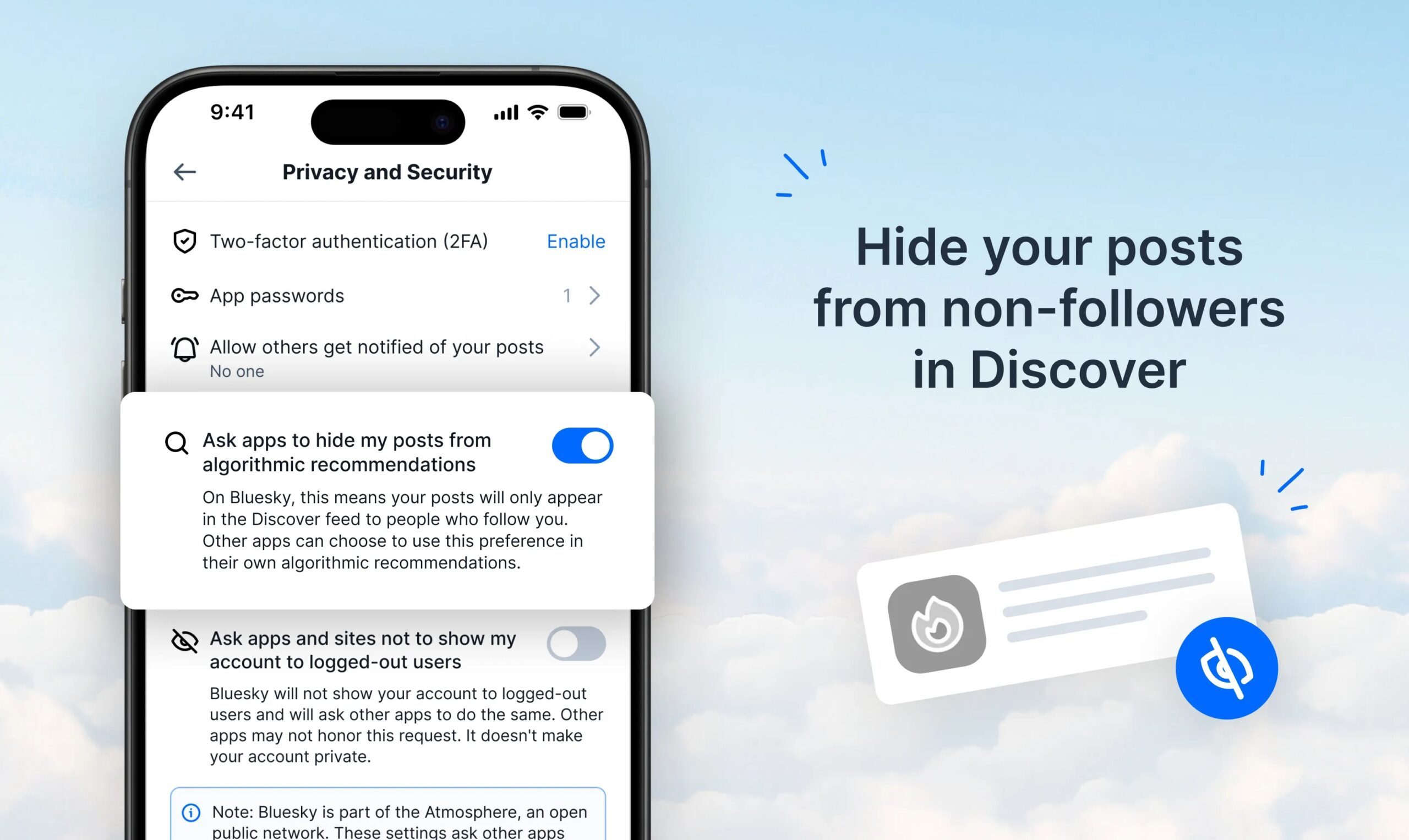
How to opt out of Bluesky’s Discover feed?
bluesky-opt-out-discover-feed

Head to Privacy and Security settings in the app and toggle “Ask apps to hide my posts from algorithmic recommendations.” Give it up to an hour to fully kick in. I flipped mine the second I read this news.

This isn’t the only new feature either. Bluesky added 10-minute video uploads a day earlier, and it’s been rolling out custom feed options too. The company called this “one of a few updates” aimed at giving people more control. Every platform chasing engagement at all costs should be taking notes, because sometimes the best feature is the one that lets you opt out entirely.

Share. Facebook Twitter Pinterest LinkedIn Telegram Reddit Email
Previous ArticleThe Video Games You Should Play This Weekend – August 28, 2026
Next Article Two-stage AI trick can finally fix the low-light struggle of smartphone cameras

Related Articles

The HiLight Studio app reveals what Google hides about the Pixel 11 Pro’s RGB light, but it’s not for everyone

The HiLight Studio app reveals what Google hides about the Pixel 11 Pro’s RGB light, but it’s not for everyone

29 August 2026
Chinese DRAM maker is putting its latest LPDDR6 memory inside Xiaomi’s next foldable phone

Chinese DRAM maker is putting its latest LPDDR6 memory inside Xiaomi’s next foldable phone

29 August 2026
You no longer need a subscription to try Google’s Dreambeans app

You no longer need a subscription to try Google’s Dreambeans app

29 August 2026
AI is taking a bigger role in short dramas, and actors are paying the price

AI is taking a bigger role in short dramas, and actors are paying the price

29 August 2026
3 underrated movies on HBO Max you should watch this weekend (August 29-30)

3 underrated movies on HBO Max you should watch this weekend (August 29-30)

29 August 2026
Hisense made a phone with a second screen you can literally take off

Hisense made a phone with a second screen you can literally take off

29 August 2026
Stay In Touch
  • Facebook
  • Twitter
  • Pinterest
  • Instagram
  • YouTube
  • Vimeo

Subscribe to Updates

Get the latest tech news and updates directly to your inbox.

Don't Miss
Showa American Story Preview: A Raunchy Good Time

Showa American Story Preview: A Raunchy Good Time

By technologistmag.com29 August 2026

Showa American Story director Xiangyu Luo was born in China and remembers rumors in the…

Take A Tour And Watch Us Hand Out Magazines At Gamescom 2026

Take A Tour And Watch Us Hand Out Magazines At Gamescom 2026

29 August 2026
Chinese DRAM maker is putting its latest LPDDR6 memory inside Xiaomi’s next foldable phone

Chinese DRAM maker is putting its latest LPDDR6 memory inside Xiaomi’s next foldable phone

29 August 2026
You no longer need a subscription to try Google’s Dreambeans app

You no longer need a subscription to try Google’s Dreambeans app

29 August 2026
AI is taking a bigger role in short dramas, and actors are paying the price

AI is taking a bigger role in short dramas, and actors are paying the price

29 August 2026
Technologist Mag
Facebook X (Twitter) Instagram Pinterest
  • Privacy
  • Terms
  • Advertise
  • Contact
© 2026 Technologist Mag. All Rights Reserved.

Type above and press Enter to search. Press Esc to cancel.