



.jpg "How to Claim Your Cut of Apple’s 0 Million Siri Settlement")


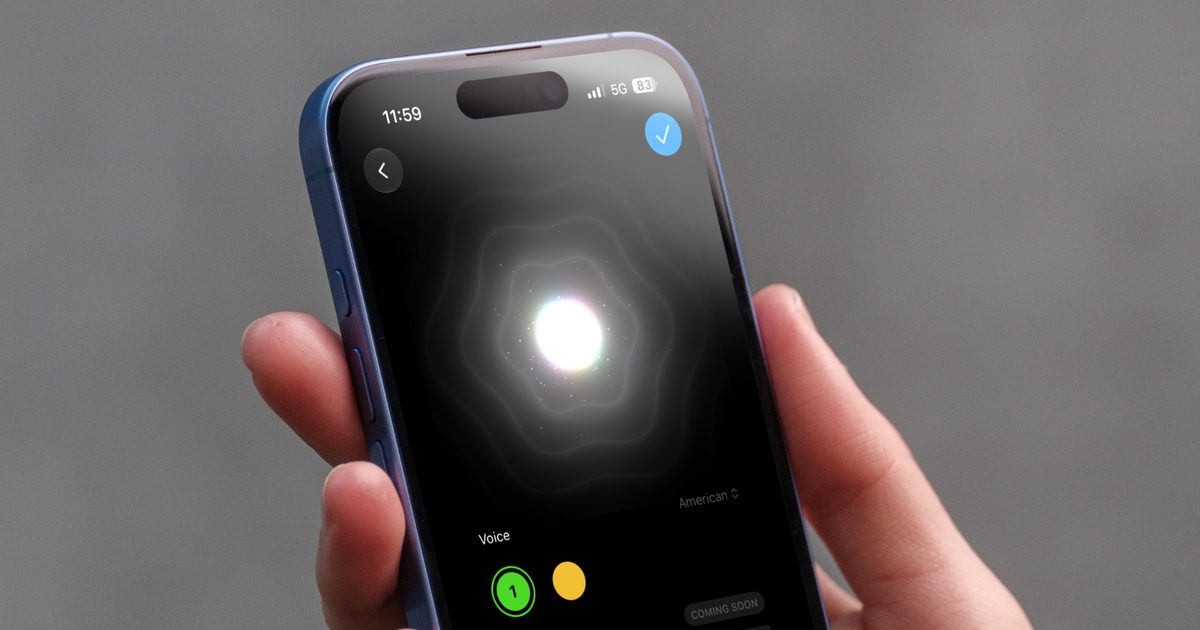
During the WWDC 2026 event, Apple demonstrated that users will finally be able to customize how Siri sounds. While this feature has been available in the Settings app since the first iOS 27 developer beta, the sliders for adjusting Siri’s voice were greyed out. With the third developer beta Apple released today, these sliders are finally operational. Here’s everything you need to know about Siri’s new voice customization features.
How do the new Siri voice controls work?
Apple offers two levels of customization for Siri AI’s voice: Pace and Expressivity. Pace changes how fast Siri AI speaks while the expressivity slider adjusts the tone and intonation, making Siri AI sound more human.
You can access this setting by heading over to Settings → Siri → Expressive Voice Preview. Here, you’ll find both sliders active with five adjustment levels each for all currently available voices. So whether you want Siri sounding flat and businesslike or full of personality, you get a decent range to play with.
The best part is how Apple lets you preview your changes. The moment you start dragging a slider, Siri plays a continuous audio sample that updates in real time. This live feedback makes it much easier to fine-tune the Siri voice to your liking. And once you land on something you like, just tap the checkmark in the top-right corner to lock it in.
One setting, several apps
Here’s a nice touch. Your custom pace and expressivity choices don’t just stay limited to Siri. Apple says these settings will carry over to Apple Maps and Safari too, so your chosen voice personality follows you across the experience instead of resetting every time you switch apps.
I’ve been playing around with these new Siri voice controls, and honestly, everyone should give them a shot. It’s such a small tweak, but it makes a real difference in how much you actually enjoy using Siri.
