

Technologist Mag
  • Home
  • Tech News
  • AI
  • Apps
  • Gadgets
  • Gaming
  • Guides
  • Laptops
  • Mobiles
  • Wearables
  • More
    • Web Stories
    • Trending
    • Press Release

Subscribe to Updates

Get the latest tech news and updates directly to your inbox.

What's On
China’s AI talent shortage has tech giants recruiting teenagers

China’s AI talent shortage has tech giants recruiting teenagers

22 July 2026
Tesla’s Summer Update adds smarter Grok, personalized navigation, and Caraoke scoring

Tesla’s Summer Update adds smarter Grok, personalized navigation, and Caraoke scoring

22 July 2026
The 10 Best Electrolyte Powders (We Tested Over 20)

The 10 Best Electrolyte Powders (We Tested Over 20)

22 July 2026
An unpatched Shark vacuum flaw could put your smart home at risk

An unpatched Shark vacuum flaw could put your smart home at risk

22 July 2026
Etsy Is In Its Flop Era, and Sellers Are Fleeing

Etsy Is In Its Flop Era, and Sellers Are Fleeing

21 July 2026
Facebook X (Twitter) Instagram
Technologist Mag
SUBSCRIBE
  • Home
  • Tech News
  • AI
  • Apps
  • Gadgets
  • Gaming
  • Guides
  • Laptops
  • Mobiles
  • Wearables
  • More
    • Web Stories
    • Trending
    • Press Release
Technologist Mag
Home » A clever Mac lets you feel vibrations through the trackpad when you click a link or button
Tech News

A clever Mac lets you feel vibrations through the trackpad when you click a link or button

By technologistmag.com25 June 20262 Mins Read
A clever Mac lets you feel vibrations through the trackpad when you click a link or button
Share
Facebook Twitter Reddit Telegram Pinterest Email

A new Mac app called HapticPad tries to make browsing more tactile. Posted by its developer on Reddit’s r/macapps community, the app uses a Mac’s Force Touch trackpad to trigger a subtle vibration when your cursor hovers over links, buttons, and input fields in the browser. So you can quite literally “feel” parts of a web page before you click them. It is a small idea, but it has the kind of obvious-in-hindsight cleverness that makes you wonder why macOS does not already do this.

So how does this work?

HapticPad works through a Mac app and a bundled Chrome extension. The developer says the trackpad vibration arrives in under 10ms, and the app can use different haptic patterns for different web elements. For example, links can use one pulse, buttons can use a different pattern, and input fields can use another. The official site says users can customize seven haptic patterns, including single, double, triple, and quad-style feedback.

The app is also being framed as an accessibility-friendly tool. Since it adds a physical feedback layer to browsing, it could help users who want an extra cue beyond visual highlighting. The developer says the settings are VoiceOver-compatible and keyboard-navigable. This sits broadly in the same lane as other oddball apps. But it is more practical than something like a $3 app that makes your MacBook play moans and other sounds when slapped.
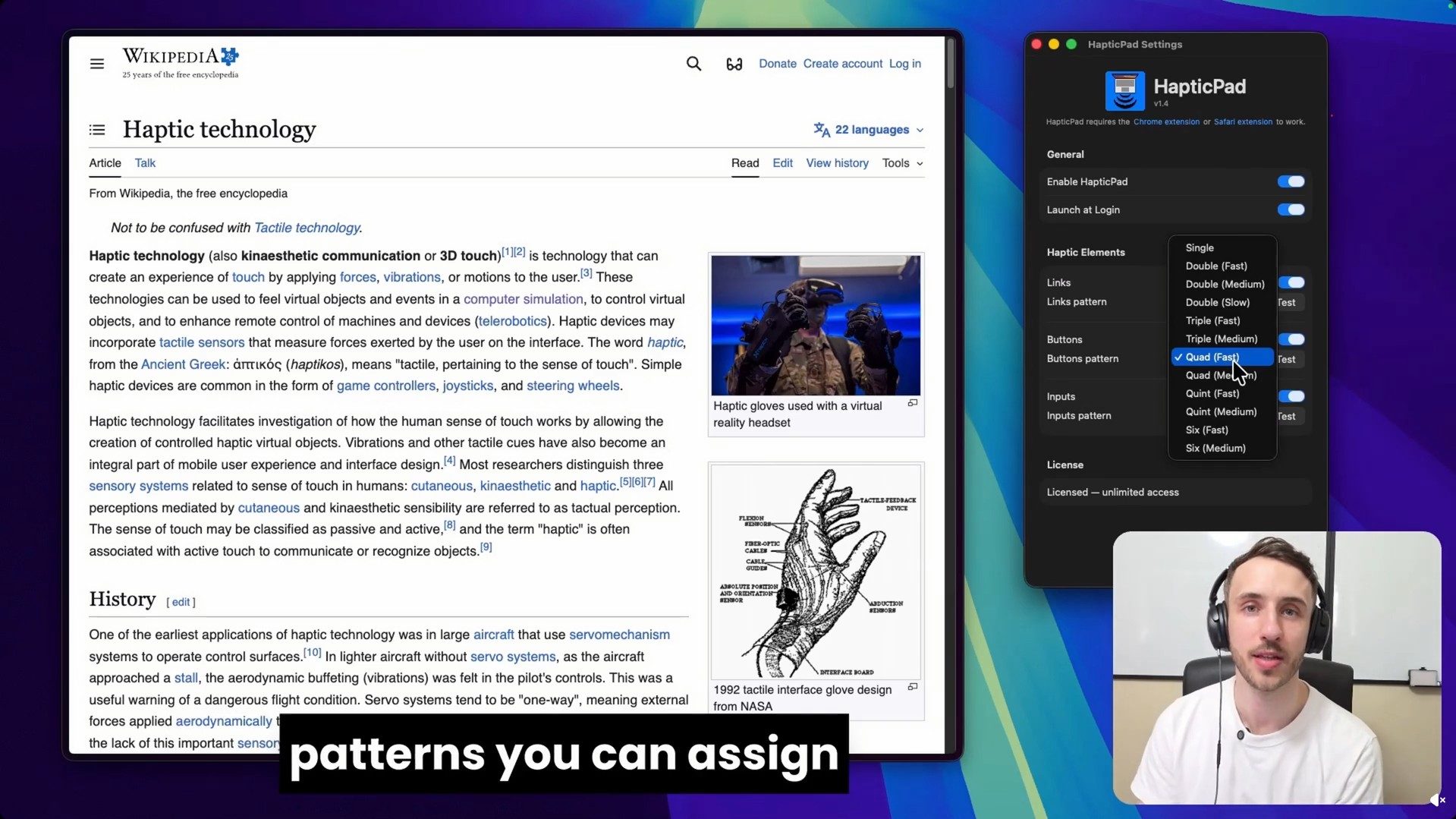
HapticPad for Mac

Price and compatibility

HapticPad costs $4.99 as a one-time purchase and includes a 7-day free trial. It requires macOS 13 Ventura or later and a Mac with a Force Touch trackpad. The developer says the Chrome extension processes element detection locally, with no URLs, page content, or analytics leaving the Mac. It is a tiny app that seems pretty nifty. Apple has already had excellent trackpad haptics for years, and HapticPad makes them seem underused.

Share. Facebook Twitter Pinterest LinkedIn Telegram Reddit Email
Previous ArticleBest Prime Day Vacuum Deals Offer Up to 42% Off (2026): Shark, Dyson, Bissell
Next Article 17 Best Prime Day Apple Deals Offering Up to 30% Off: iPad, Apple Watch, MacBooks, and More (2026)

Related Articles

China’s AI talent shortage has tech giants recruiting teenagers

China’s AI talent shortage has tech giants recruiting teenagers

22 July 2026
Tesla’s Summer Update adds smarter Grok, personalized navigation, and Caraoke scoring

Tesla’s Summer Update adds smarter Grok, personalized navigation, and Caraoke scoring

22 July 2026
The 10 Best Electrolyte Powders (We Tested Over 20)

The 10 Best Electrolyte Powders (We Tested Over 20)

22 July 2026
An unpatched Shark vacuum flaw could put your smart home at risk

An unpatched Shark vacuum flaw could put your smart home at risk

22 July 2026
Etsy Is In Its Flop Era, and Sellers Are Fleeing

Etsy Is In Its Flop Era, and Sellers Are Fleeing

21 July 2026
Beatbot AquaSense X review: The pool cleaner for those that want to be pampered

Beatbot AquaSense X review: The pool cleaner for those that want to be pampered

21 July 2026
Stay In Touch
  • Facebook
  • Twitter
  • Pinterest
  • Instagram
  • YouTube
  • Vimeo

Subscribe to Updates

Get the latest tech news and updates directly to your inbox.

Don't Miss
Tesla’s Summer Update adds smarter Grok, personalized navigation, and Caraoke scoring

Tesla’s Summer Update adds smarter Grok, personalized navigation, and Caraoke scoring

By technologistmag.com22 July 2026

Tesla just confirmed its 2026 Summer Release is rolling out soon, and it’s stacked with…

The 10 Best Electrolyte Powders (We Tested Over 20)

The 10 Best Electrolyte Powders (We Tested Over 20)

22 July 2026
An unpatched Shark vacuum flaw could put your smart home at risk

An unpatched Shark vacuum flaw could put your smart home at risk

22 July 2026
Etsy Is In Its Flop Era, and Sellers Are Fleeing

Etsy Is In Its Flop Era, and Sellers Are Fleeing

21 July 2026
Beatbot AquaSense X review: The pool cleaner for those that want to be pampered

Beatbot AquaSense X review: The pool cleaner for those that want to be pampered

21 July 2026
Technologist Mag
Facebook X (Twitter) Instagram Pinterest
  • Privacy
  • Terms
  • Advertise
  • Contact
© 2026 Technologist Mag. All Rights Reserved.

Type above and press Enter to search. Press Esc to cancel.