
Technologist Mag
  • Home
  • Tech News
  • AI
  • Apps
  • Gadgets
  • Gaming
  • Guides
  • Laptops
  • Mobiles
  • Wearables
  • More
    • Web Stories
    • Trending
    • Press Release

Subscribe to Updates

Get the latest tech news and updates directly to your inbox.

What's On
A New Chatbot Wants to Unlock the Secrets in Tattered Ancient Greek Records

A New Chatbot Wants to Unlock the Secrets in Tattered Ancient Greek Records

22 September 2026
A New Tool Found Malware That’s Guided by an AI Hive Mind—No Humans in Sight

A New Tool Found Malware That’s Guided by an AI Hive Mind—No Humans in Sight

22 September 2026
I Built AI Clones of My Coworkers. Things Got Weird

I Built AI Clones of My Coworkers. Things Got Weird

22 September 2026
How to Claim Your Cut of Apple’s 0 Million Siri Settlement

How to Claim Your Cut of Apple’s $250 Million Siri Settlement

22 September 2026
Is a Home Security System Subscription Worth It? (2026)

Is a Home Security System Subscription Worth It? (2026)

22 September 2026
Facebook X (Twitter) Instagram
Technologist Mag
SUBSCRIBE
  • Home
  • Tech News
  • AI
  • Apps
  • Gadgets
  • Gaming
  • Guides
  • Laptops
  • Mobiles
  • Wearables
  • More
    • Web Stories
    • Trending
    • Press Release
Technologist Mag
Home » Windows users can finally pick when updates stop with Microsoft’s latest patch
Tech News

Windows users can finally pick when updates stop with Microsoft’s latest patch

By technologistmag.com15 July 20262 Mins Read
Windows users can finally pick when updates stop with Microsoft’s latest patch
Share
Facebook Twitter Reddit Telegram Pinterest Email

Patch Tuesday updates are usually a shrug-and-install affair, but Microsoft’s July 2026 release actually gives you something to be excited about.

You can grab this update, tagged KB5101650, right now through Settings, or manually via the Microsoft Update Catalog if you’d rather not wait for it to roll out.

So what’s the big Windows Update change here?

Head to Settings, then Windows Update, and you’ll find a new calendar tool that lets you pause updates by simply picking an end date up to 35 days out. 

Once that window closes, Windows will resume checking for updates unless you go back in and pause it again. It’s not a true “forever” pause since you still have to renew it manually. 

However, it’s still a massive upgrade over the old system, which only let you delay updates for a handful of days at a time before forcing your hand again.
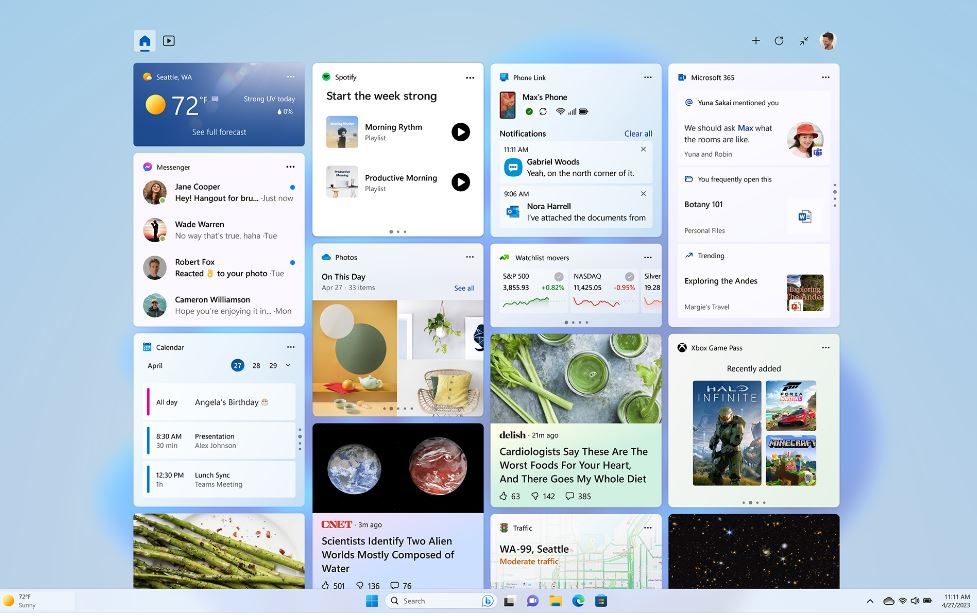
Windows 11 Widgets pictured in a screenshot.

What else is packed into this update?

Point-in-time Restore is arguably the bigger deal in the long term. Windows now automatically creates restore points covering your apps, settings, and personal files. So, if something breaks, you can roll your whole PC back to a recent working state instead of troubleshooting blindly. 

Widgets also got a much-needed decluttering. They no longer pop open on hover, open straight to the dashboard by default, and give you real control over notification badges. Accessibility gains a screen tint option to reduce eye strain, plus there’s a Magnifier that lets you enter an exact zoom percentage. 

File Explorer now surfaces quick actions like “Ask Copilot” when you hover over a file, even on work and school accounts. Under the hood, PCs with more than 32GB of memory can now run larger local AI models thanks to a tweak to the Graphics Kernel.

Share. Facebook Twitter Pinterest LinkedIn Telegram Reddit Email
Previous ArticleIt’s hot out there, but please stop putting your warm phones in the fridge
Next Article Canva Code 2.0 just made vibe coding way less intimidating for everyone

Related Articles

A New Chatbot Wants to Unlock the Secrets in Tattered Ancient Greek Records

A New Chatbot Wants to Unlock the Secrets in Tattered Ancient Greek Records

22 September 2026
A New Tool Found Malware That’s Guided by an AI Hive Mind—No Humans in Sight

A New Tool Found Malware That’s Guided by an AI Hive Mind—No Humans in Sight

22 September 2026
I Built AI Clones of My Coworkers. Things Got Weird

I Built AI Clones of My Coworkers. Things Got Weird

22 September 2026
How to Claim Your Cut of Apple’s 0 Million Siri Settlement

How to Claim Your Cut of Apple’s $250 Million Siri Settlement

22 September 2026
Is a Home Security System Subscription Worth It? (2026)

Is a Home Security System Subscription Worth It? (2026)

22 September 2026
Everything You Know About Political Violence Is Probably Wrong

Everything You Know About Political Violence Is Probably Wrong

22 September 2026
Stay In Touch
  • Facebook
  • Twitter
  • Pinterest
  • Instagram
  • YouTube
  • Vimeo

Subscribe to Updates

Get the latest tech news and updates directly to your inbox.

Don't Miss
A New Tool Found Malware That’s Guided by an AI Hive Mind—No Humans in Sight

A New Tool Found Malware That’s Guided by an AI Hive Mind—No Humans in Sight

By technologistmag.com22 September 2026

For years, cybersecurity practitioners have tracked different types of malware and detected potential infections using…

I Built AI Clones of My Coworkers. Things Got Weird

I Built AI Clones of My Coworkers. Things Got Weird

22 September 2026
How to Claim Your Cut of Apple’s 0 Million Siri Settlement

How to Claim Your Cut of Apple’s $250 Million Siri Settlement

22 September 2026
Is a Home Security System Subscription Worth It? (2026)

Is a Home Security System Subscription Worth It? (2026)

22 September 2026
Everything You Know About Political Violence Is Probably Wrong

Everything You Know About Political Violence Is Probably Wrong

22 September 2026
Technologist Mag
Facebook X (Twitter) Instagram Pinterest
  • Privacy
  • Terms
  • Advertise
  • Contact
© 2026 Technologist Mag. All Rights Reserved.

Type above and press Enter to search. Press Esc to cancel.
