



Technologist Mag
  • Home
  • Tech News
  • AI
  • Apps
  • Gadgets
  • Gaming
  • Guides
  • Laptops
  • Mobiles
  • Wearables
  • More
    • Web Stories
    • Trending
    • Press Release

Subscribe to Updates

Get the latest tech news and updates directly to your inbox.

What's On
Gears of War: E-Day looks darker and more brutal than ever

Gears of War: E-Day looks darker and more brutal than ever

26 August 2026
Mewgenics Is Coming To Consoles In September

Mewgenics Is Coming To Consoles In September

26 August 2026
Genshin Impact creator goes dark with an RPG that looks part Elden Ring, part Monster Hunter

Genshin Impact creator goes dark with an RPG that looks part Elden Ring, part Monster Hunter

25 August 2026
Final Fantasy VII Revelation Spotlights Its – Aug 25, 2026

Final Fantasy VII Revelation Spotlights Its – Aug 25, 2026

25 August 2026
PUBG’s new shooter looks absolutely unhinged, and I kind of love it

PUBG’s new shooter looks absolutely unhinged, and I kind of love it

25 August 2026
Facebook X (Twitter) Instagram
Technologist Mag
SUBSCRIBE
  • Home
  • Tech News
  • AI
  • Apps
  • Gadgets
  • Gaming
  • Guides
  • Laptops
  • Mobiles
  • Wearables
  • More
    • Web Stories
    • Trending
    • Press Release
Technologist Mag
Home » Windows 11 Search is getting bigger, but only by 4 pixels
Tech News

Windows 11 Search is getting bigger, but only by 4 pixels

By technologistmag.com9 July 20262 Mins Read
Windows 11 Search is getting bigger, but only by 4 pixels
Share
Facebook Twitter Reddit Telegram Pinterest Email

If you have used Windows 11 Search after the June update, you may have noticed it feels a little less annoying. Microsoft recently made the Start menu and Search more responsive, and also fixed one of Search’s stranger limits by letting it find local files using just two characters.

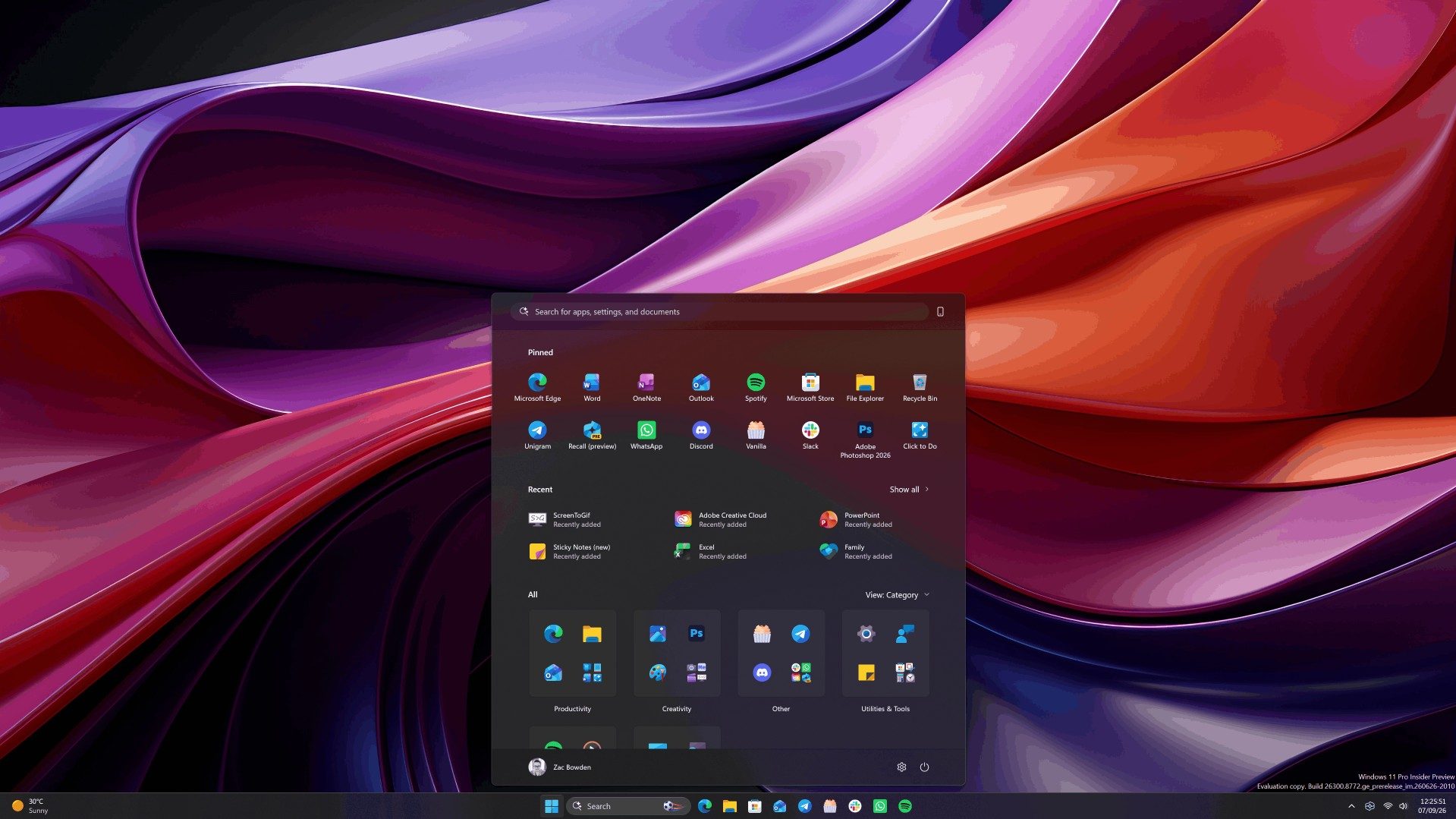
Now, the company appears to be making a much smaller change. According to Windows Central, Microsoft accidentally revealed that the search box in the Taskbar and Start menu is getting 4 pixels taller. Four pixels sounds like the kind of change only a UI/UX designer could love, but screenshots from the Insider Preview build suggest it is visible once you know where to look.

So what exactly is changing?

The search box is expected to look a little chunkier than the current version. On the Taskbar, it moves closer to the top edge. In the Start menu, the extra height gives the search bar more presence and slightly shifts the surrounding content.
Art, Graphics, Computer

This does not appear to change how Search works. It is mainly a visual adjustment, though users may still notice it because the Taskbar and Start menu are parts of Windows people see all day.

Why could Microsoft be doing this?

Microsoft has not explained the change, but there is one likely reason. Windows Central points out that the taller search box looks closer to the Ask Copilot search box Microsoft is preparing for Windows 11.

Big changes coming soon to Windows 11.

The search box that appears on the Taskbar and in Start is changing… by getting 4 whole pixels taller. I did the research, and the change is noticeable.

With it being taller, it takes up more vertical space on the Taskbar. Additionally,…

— Zac Bowden (@zacbowden) July 9, 2026

Ask Copilot is a separate search experience that brings Copilot chat directly into the Taskbar. It is currently aimed at commercial customers and needs to be enabled manually, so most people will not see it right away. The regular Search box may simply be getting adjusted so Windows Search and Ask Copilot feel more visually consistent.

Share. Facebook Twitter Pinterest LinkedIn Telegram Reddit Email
Previous ArticleReport: Obsidian Cancels Avowed Sequel To Begin Work On A New Fallout Game
Next Article The 1X Neo Robot Has Freaky Fast Fingers

Related Articles

Gears of War: E-Day looks darker and more brutal than ever

Gears of War: E-Day looks darker and more brutal than ever

26 August 2026
Genshin Impact creator goes dark with an RPG that looks part Elden Ring, part Monster Hunter

Genshin Impact creator goes dark with an RPG that looks part Elden Ring, part Monster Hunter

25 August 2026
PUBG’s new shooter looks absolutely unhinged, and I kind of love it

PUBG’s new shooter looks absolutely unhinged, and I kind of love it

25 August 2026
Game of Thrones: War for Westeros puts the fate of the Iron Throne in your hands

Game of Thrones: War for Westeros puts the fate of the Iron Throne in your hands

25 August 2026
Metro 2039 has no heroes. It trades hope for revenge, and I’m all for this new direction

Metro 2039 has no heroes. It trades hope for revenge, and I’m all for this new direction

25 August 2026
The Best Early Labor Day Kitchen Deals to Ease You Back Into Fall (2026)

The Best Early Labor Day Kitchen Deals to Ease You Back Into Fall (2026)

25 August 2026
Stay In Touch
  • Facebook
  • Twitter
  • Pinterest
  • Instagram
  • YouTube
  • Vimeo

Subscribe to Updates

Get the latest tech news and updates directly to your inbox.

Don't Miss
Mewgenics Is Coming To Consoles In September

Mewgenics Is Coming To Consoles In September

By technologistmag.com26 August 2026

Following a live performance of the Mewgenics soundtrack, Geoff Keighley revealed on the Opening Night…

Genshin Impact creator goes dark with an RPG that looks part Elden Ring, part Monster Hunter

Genshin Impact creator goes dark with an RPG that looks part Elden Ring, part Monster Hunter

25 August 2026
Final Fantasy VII Revelation Spotlights Its – Aug 25, 2026

Final Fantasy VII Revelation Spotlights Its – Aug 25, 2026

25 August 2026
PUBG’s new shooter looks absolutely unhinged, and I kind of love it

PUBG’s new shooter looks absolutely unhinged, and I kind of love it

25 August 2026
Every Notable Announcement At Gamescom Opening Night Live 2026

Every Notable Announcement At Gamescom Opening Night Live 2026

25 August 2026
Technologist Mag
Facebook X (Twitter) Instagram Pinterest
  • Privacy
  • Terms
  • Advertise
  • Contact
© 2026 Technologist Mag. All Rights Reserved.

Type above and press Enter to search. Press Esc to cancel.