


Technologist Mag
  • Home
  • Tech News
  • AI
  • Apps
  • Gadgets
  • Gaming
  • Guides
  • Laptops
  • Mobiles
  • Wearables
  • More
    • Web Stories
    • Trending
    • Press Release

Subscribe to Updates

Get the latest tech news and updates directly to your inbox.

What's On
Mark Zuckerberg’s AI Manifesto Is 6,500 Words—and Barely Says Anything

Mark Zuckerberg’s AI Manifesto Is 6,500 Words—and Barely Says Anything

13 August 2026
Microsoft is bringing its Copilot apps together before its planned ‘super app’ debut

Microsoft is bringing its Copilot apps together before its planned ‘super app’ debut

13 August 2026
Netflix Closes Two Gaming Studios, Including – Aug 13, 2026

Netflix Closes Two Gaming Studios, Including – Aug 13, 2026

13 August 2026
Pixel 11 Pro Fold vs. Galaxy Z Fold 8 Ultra: Google plays it safe, Samsung goes all-in

Pixel 11 Pro Fold vs. Galaxy Z Fold 8 Ultra: Google plays it safe, Samsung goes all-in

13 August 2026
WhatsApp’s new Scam Alert feature will flag scam messages while keeping your chats private

WhatsApp’s new Scam Alert feature will flag scam messages while keeping your chats private

13 August 2026
Facebook X (Twitter) Instagram
Technologist Mag
SUBSCRIBE
  • Home
  • Tech News
  • AI
  • Apps
  • Gadgets
  • Gaming
  • Guides
  • Laptops
  • Mobiles
  • Wearables
  • More
    • Web Stories
    • Trending
    • Press Release
Technologist Mag
Home » This cross-device clipboard app solves the copy-paste problem I keep running into on my Mac
Tech News

This cross-device clipboard app solves the copy-paste problem I keep running into on my Mac

By technologistmag.com27 June 20263 Mins Read
This cross-device clipboard app solves the copy-paste problem I keep running into on my Mac
Share
Facebook Twitter Reddit Telegram Pinterest Email

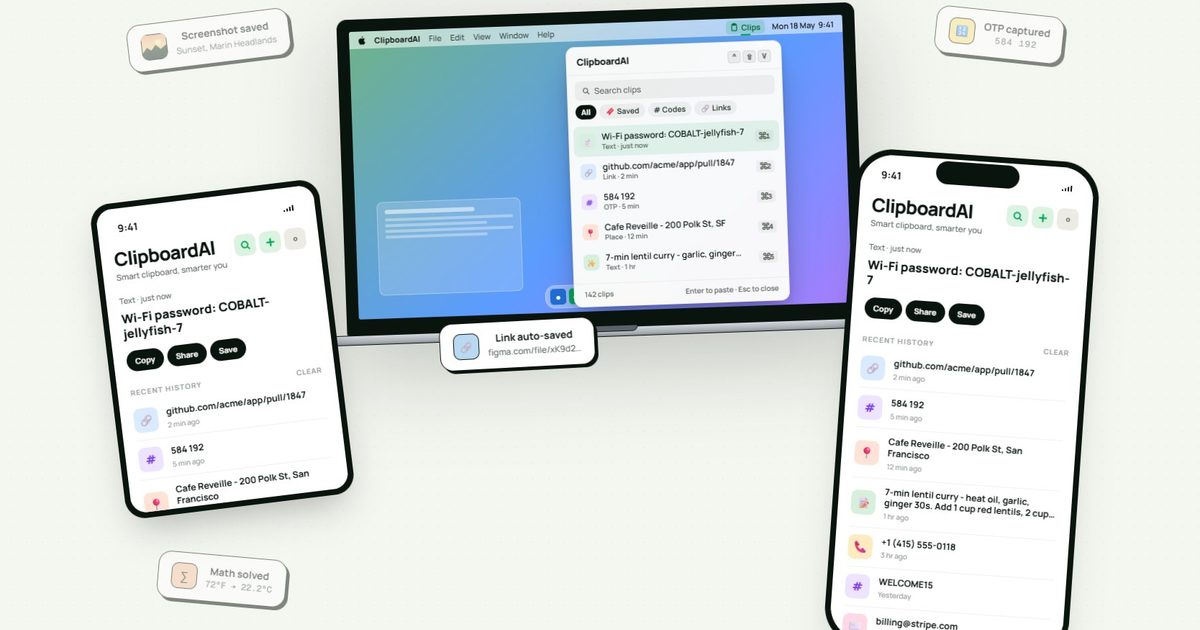
I have lost count of how many times I have copied something important, copied another thing before pasting it, and then realized the first item was gone. It is a small frustration, but it happens often enough to become annoying. I recently came across ClipboardAI, which caught my attention because it goes beyond Apple’s built-in clipboard by saving copied items into a searchable history.

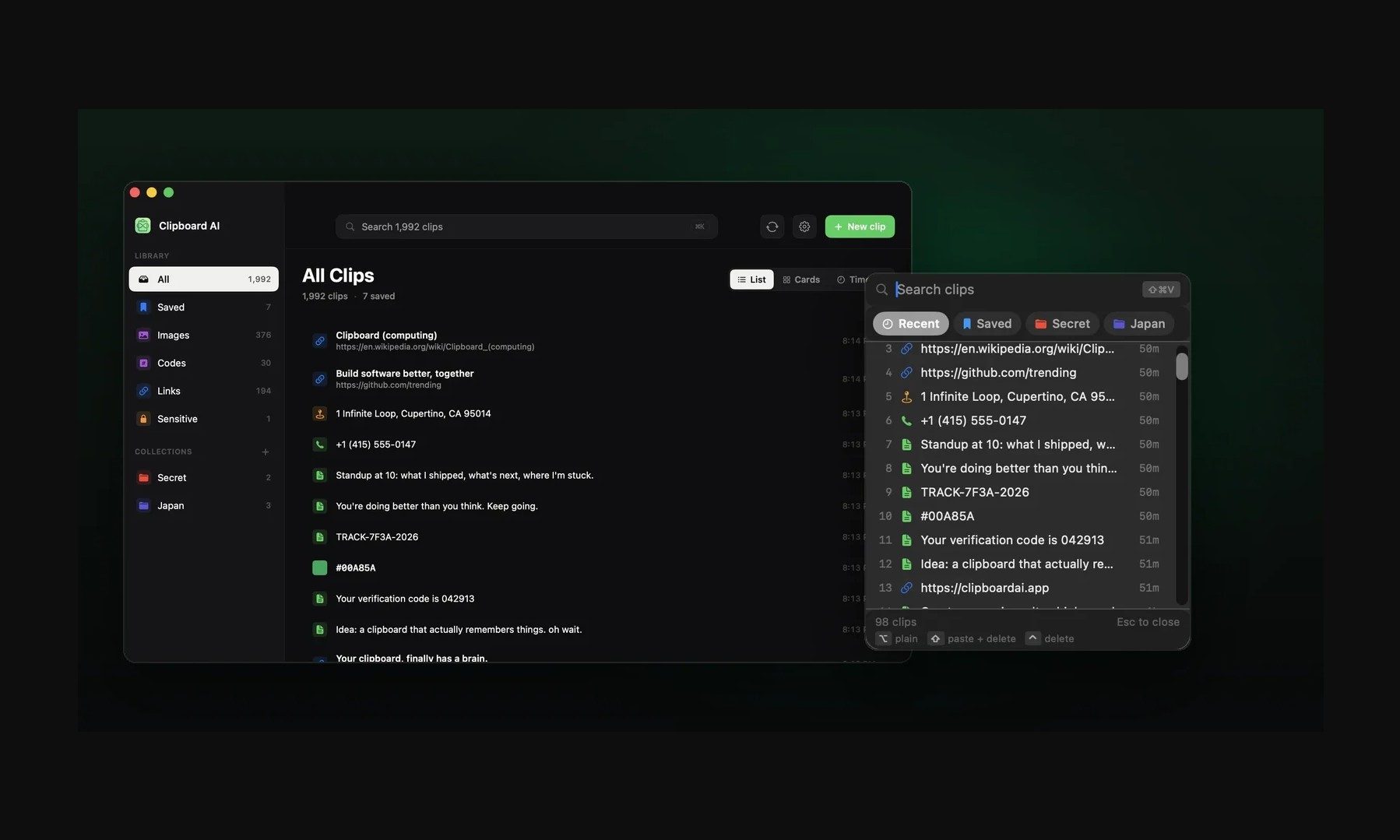
Instead of replacing the last thing you copied every time, ClipboardAI keeps a searchable record of copied text, links, codes, email addresses, phone numbers, addresses, and images across iPhone, iPad, and Mac. That means an older clip does not disappear just because you copied something new.

It saves, sorts, and brings clips back quickly

ClipboardAI uses on-device AI to sort copied items into links, codes, emails, addresses, phone numbers, text, and images. Users can also create collections for material they reuse often, including research links, templates, travel details, or saved snippets.

The keyboard extension is the feature that makes the app feel most useful. It can show up to 20 recent clips inside any iOS text field, so you do not have to leave Messages, Mail, Slack, Safari, or another app to paste something copied earlier.

The app can summarize copied text, generate link previews, detect languages, offer translations, turn lists into checklists, and solve math expressions or unit conversions. Some tools will be useful often, while others are more situational.

The privacy approach is important

Since clipboards often contain private information like passwords, codes, addresses, emails, phone numbers, and copied messages, privacy is a make-or-break factor for apps like this. ClipboardAI keeps AI features on-device, stores clips locally using SwiftData, and avoids analytics, ads, third-party SDKs, and developer-run servers.
Page, Text, File

The app also treats sensitive clips differently from regular copied items. It can detect passwords, API tokens, credit card numbers, and SSNs, and then blur them by default. Passwords can disappear after 60 seconds, and sensitive clips stay out of the keyboard extension unless the user changes that setting.

Sync runs through the user’s own iCloud account and is optional. The free version includes automatic capture, categories, search, and up to 10 saved clips. Pro adds unlimited clips, iCloud sync, the keyboard extension, AI features, and collections, with a 7-day yearly trial and a $24.99 lifetime option.

Not everyone needs a clipboard manager. But if you lose copied links, codes, notes, or addresses several times a week, ClipboardAI could be a useful replacement for Apple’s built-in clipboard.
Share. Facebook Twitter Pinterest LinkedIn Telegram Reddit Email
Previous ArticleOpenAI Has New AI Models. Here’s Why You Can’t Use Them
Next Article 27 Best Prime Day Beauty Deals of 2026 (We Sifted Through Hundreds to Pick Them)

Related Articles

Mark Zuckerberg’s AI Manifesto Is 6,500 Words—and Barely Says Anything

Mark Zuckerberg’s AI Manifesto Is 6,500 Words—and Barely Says Anything

13 August 2026
Microsoft is bringing its Copilot apps together before its planned ‘super app’ debut

Microsoft is bringing its Copilot apps together before its planned ‘super app’ debut

13 August 2026
Pixel 11 Pro Fold vs. Galaxy Z Fold 8 Ultra: Google plays it safe, Samsung goes all-in

Pixel 11 Pro Fold vs. Galaxy Z Fold 8 Ultra: Google plays it safe, Samsung goes all-in

13 August 2026
WhatsApp’s new Scam Alert feature will flag scam messages while keeping your chats private

WhatsApp’s new Scam Alert feature will flag scam messages while keeping your chats private

13 August 2026
I went hands-on with the Pixel 11, and Google’s cheapest flagship finally has it all

I went hands-on with the Pixel 11, and Google’s cheapest flagship finally has it all

13 August 2026
The best smart home gym equipment

The best smart home gym equipment

13 August 2026
Stay In Touch
  • Facebook
  • Twitter
  • Pinterest
  • Instagram
  • YouTube
  • Vimeo

Subscribe to Updates

Get the latest tech news and updates directly to your inbox.

Don't Miss
Microsoft is bringing its Copilot apps together before its planned ‘super app’ debut

Microsoft is bringing its Copilot apps together before its planned ‘super app’ debut

By technologistmag.com13 August 2026

If you have been staring at two separate Copilot icons cluttering your taskbar, that annoyance…

Netflix Closes Two Gaming Studios, Including – Aug 13, 2026

Netflix Closes Two Gaming Studios, Including – Aug 13, 2026

13 August 2026
Pixel 11 Pro Fold vs. Galaxy Z Fold 8 Ultra: Google plays it safe, Samsung goes all-in

Pixel 11 Pro Fold vs. Galaxy Z Fold 8 Ultra: Google plays it safe, Samsung goes all-in

13 August 2026
WhatsApp’s new Scam Alert feature will flag scam messages while keeping your chats private

WhatsApp’s new Scam Alert feature will flag scam messages while keeping your chats private

13 August 2026
I went hands-on with the Pixel 11, and Google’s cheapest flagship finally has it all

I went hands-on with the Pixel 11, and Google’s cheapest flagship finally has it all

13 August 2026
Technologist Mag
Facebook X (Twitter) Instagram Pinterest
  • Privacy
  • Terms
  • Advertise
  • Contact
© 2026 Technologist Mag. All Rights Reserved.

Type above and press Enter to search. Press Esc to cancel.